
Linbis › Compare › Magaya alternative
Compare · Magaya alternative
Magaya Alternative for Freight Forwarders (2026): What Switching to Linbis Involves
Who should stay on Magaya, who should look, what actually moves across — accounts, shipments, warehouse receipts, documents, the books — and the four-week path from export to month-end on the new system. Magaya’s capabilities are quoted from its own site and labelled as such; Linbis’s are the shipped product, with counts.
Short answer. Magaya describes itself as “the #1 freight management platform for freight forwarders and customs brokers,” sells five products — Supply Chain, Customs Compliance, WMS, Rate Management and a Digital Freight Portal — and says it has 2,300+ customers in 100+ countries. Its pricing page returns a 404; a plan is sized in a sales conversation. Linbis puts the same operation — forwarding, warehouse, US customs filing, rates, portal — on one record, includes the warehouse on the Premium plan with offline scanning and snapshot storage billing, ships a double-entry ledger with a QuickBooks Online sync (payments both ways), and publishes the price: $150 a month including one user, $299 including three, free trial without a card.
A Magaya alternative is worth the move when you want the price before the demo, the ledger inside, the warehouse on the same file as the shipment, and configuration you do yourself instead of a project. It is not worth the move if your business is the warehouse itself and your operations team is happy — say so and stay. Both answers are below.
Who should stay on Magaya
Three kinds of operation should read this page and then close it. A warehouse business first, a forwarder second: if the WMS is the product you sell — third-party fulfilment for customers who never ship internationally — Magaya WMS is built as a standalone product and you should compare it against dedicated warehouse systems, not against a forwarding platform. A customs brokerage filing entries all day: Magaya positions its Customs Compliance product around ABI entry filing (a customer on its homepage calls it “the best ABI program”), and Linbis’s electronic filing is ISF and AMS, with entry filing left to the broker’s path — so a brokerage should test that difference before anything else. A team that has finished configuring Magaya and is happy: a migration is four weeks of attention; if nothing on this page names a problem you have, the cheapest platform is the one you already run.
Everyone else — the forwarder or NVOCC whose warehouse serves the forwarding desk, who wants a published price, a ledger they can file from, customs filed from the shipment, and a system they configure themselves — keeps reading.
Magaya vs Linbis: the comparison table
Alphabetical. The Magaya column is its public positioning — what magaya.com says on the date above — because we have not operated the product, and we say so. The Linbis column describes the shipped product, with counts taken from its configuration.
| Row | Linbis | Magaya (public positioning) |
|---|---|---|
| Built for | Forwarders, NVOCCs, customs brokers and 3PLs — one office or many — that want enterprise configuration without a consulting project, and the price up front | “Freight forwarders and customs brokers”; forwarding plus warehouse; 2,300+ customers in 100+ countries (its figures) |
| Products | One platform: quote, shipping orders, shipments, consolidation, warehouse, documents, customs filing, invoicing, AP, ledger, agents, CRM, portal, email copilot | Five: Magaya Supply Chain, Customs Compliance, WMS, Rate Management, Digital Freight Portal |
| Published price | Published. $150 / month incl. 1 user · $299 / month incl. 3 users · Enterprise by quote — linbis.com/pricing | Not published — magaya.com/pricing returns 404 |
| Warehouse | Included on Premium: receipts and releases with proof of delivery, zones and bins, piece/pallet/container nesting, an installable scan app that works offline and replays in order, manifest import with per-line reconciliation, storage billing frozen as a per-piece snapshot per run, releases that cannot be self-approved — and a Magaya-style warehouse receipt, restyled in Linbis’s document design, as the default receipt form, with a WMS layout as the alternative | Magaya WMS — warehouse management as a core product (public positioning) |
| Customs filing | ISF 10+2 assembled from the shipment, completeness-scored, transmitted to CBP standalone or as ISF-5 on the AMS manifest bill, under your own SCAC and bond; CBP-approved software provider; EEI validation; denied-party screening (US, EU, UK, UN); duty and landed cost per line. Entry (ABI) is the broker’s path | Magaya Customs Compliance — AMS, ISF and ABI entry filing (public positioning) |
| Accounting | Income and expense on one charge line in two currencies with profit per line; 91-account freight chart of accounts; periods that close; AR/AP subledgers; agent statements; books in Linbis, in QuickBooks Online, or both via a sync across 13 entity types (payments both ways) | Accounting module inside the suite (public positioning) |
| Rates and quoting | A carrier’s spreadsheet, PDF or scanned tariff becomes priced quote lines; unknown bases refused, not guessed; customer contract cards fail-closed with four-eyes approval; the printed quotation edited and sent from inside the email thread | Magaya Rate Management (public positioning) |
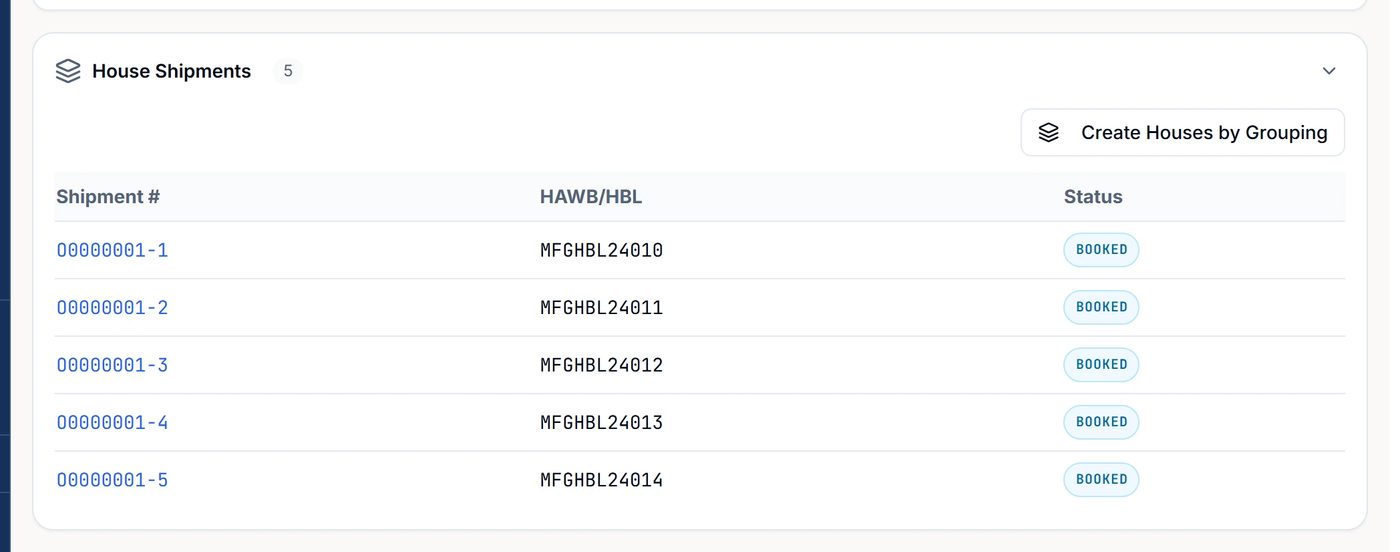
| Consolidation | Up to 500 shipping orders per import → houses in one action (batches of 50); 19 fields cascade master → house; change the carrier, vessel, voyage, flight, ETD or ETA on the master and every house updates | Consolidation with warehouse receiving linked to forwarding files (public positioning) |
| Tracking | Container milestones from Maersk and CMA CGM over DCSA, pulled on request with your own carrier credentials; flights on 50 major cargo and passenger airlines followed by live aircraft position every five minutes once OpenSky Tracking is switched on, with departure and arrival recorded on the file; four container clocks, each with its own free time and daily rate | Visibility and tracking for customers (public positioning) |
| Customer portal | 18 routes — booking and quote requests that arrive assigned, document approvals, warehouse inventory, delivery scheduling, messaging — in 8 languages; no-login tracking links | Magaya Digital Freight Portal (public positioning) |
| AI | 24 email classifications (23 freight types plus unknown) with a confidence score on each; extraction from PDF and image attachments with evidence; one Approve creates the record and fires its workflow; then four autonomy levels across 35 action categories, an envelope you define, high-risk actions always human | Automation and AI features across the suite (public positioning) |
| Languages | 7 interface languages — English, Spanish, Portuguese, French, German, Italian, Chinese; portal in 8 | English and Spanish site; long US–Latin America presence (public positioning) |
| Getting live | Free trial, no card; a working chart of accounts, more than 90 document templates and a permissive workflow from the first login; import wizards (shipments, accounts, shipping orders, warehouse receipts) with dry-run preview; phased migration on Premium and Enterprise for customers leaving the old Linbis Logistics platform | Sales-led implementation (public positioning) |
| Honest weakness | Smaller company; small, old public review base; electronic customs filing is US CBP only — no ABI entry filing; divisions are a reporting tag, not per-entity ledgers | No published price; the plan is sized by a sales conversation |
Magaya rows are its public positioning as read on magaya.com on the date above; we have not operated the product. We do not reprint third-party star ratings; check G2 and Capterra directly and note the review counts and dates.
The warehouse — the row people assume Magaya wins
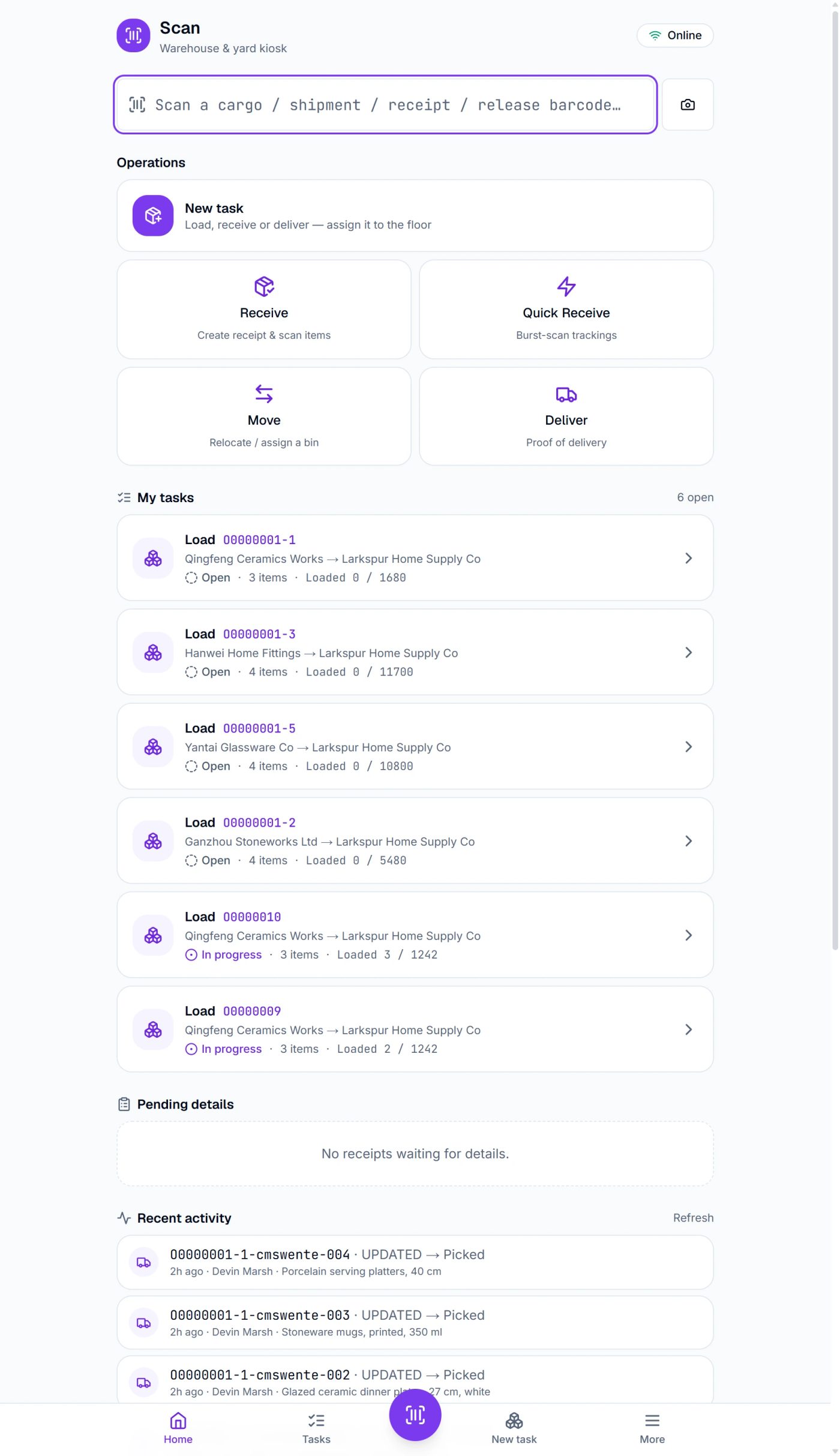
Magaya’s reputation rests on forwarding plus warehouse in one system, and it has earned it. The question for a Magaya alternative is not whether a warehouse module exists but what it does on a real dock. On Linbis the warehouse is included on Premium, and it is built for the forwarder’s warehouse — the one that receives customers’ cargo against a file, holds it, consolidates it and releases it — rather than as a standalone WMS. Receiving is done by barcode on an installable scan app that keeps working when the Wi-Fi drops and replays in order; the receipt records the condition per commodity; cargo nests piece → pallet → container in zones and bins; a manifest import reconciles arrivals per line; storage billing freezes a per-piece snapshot on every run so a disputed invoice can be reproduced; releases carry proof of delivery and cannot be approved by the person who created them; the customer sees their inventory in the portal. And the default receipt form in Linbis is a Magaya-style warehouse receipt, modelled on Magaya’s receipt and restyled in Linbis’s document design, with a WMS layout as the alternative.
If your warehouse is the whole business — pick, pack and ship for e-commerce merchants with no forwarding — test a dedicated WMS too. If it serves the forwarding desk, receive one real consignment on Linbis during the trial and compare the receipt, the storage charge and the release with what you get today.
Customs filing under your own bond
Magaya’s Customs Compliance product covers AMS, ISF and ABI entry filing (its positioning), and a brokerage should weigh that ABI coverage heavily. Linbis is a CBP-approved software provider for ISF and AMS: the ISF 10+2 is assembled from the parties and commodities already on the shipment, scored for completeness before it goes, converted to the X12 message CBP expects, and transmitted — standalone, or as an ISF-5 riding the AMS 309 manifest bill — under your own SCAC and bond, with an attestation on every transmission. Export declarations are validated for EEI; parties are screened against the US, EU, UK and UN denied-party lists; duty and landed cost are layered per line. Entry filing (ABI) is the broker’s path on Linbis, and filings outside the United States are documents handed to a broker. For a forwarder or NVOCC that files its own ISF and AMS and hands entries to a broker, that is the whole job; for a brokerage that files entries, it is not, and this page says so. Details on the AMS and ISF page.
Where the money lives
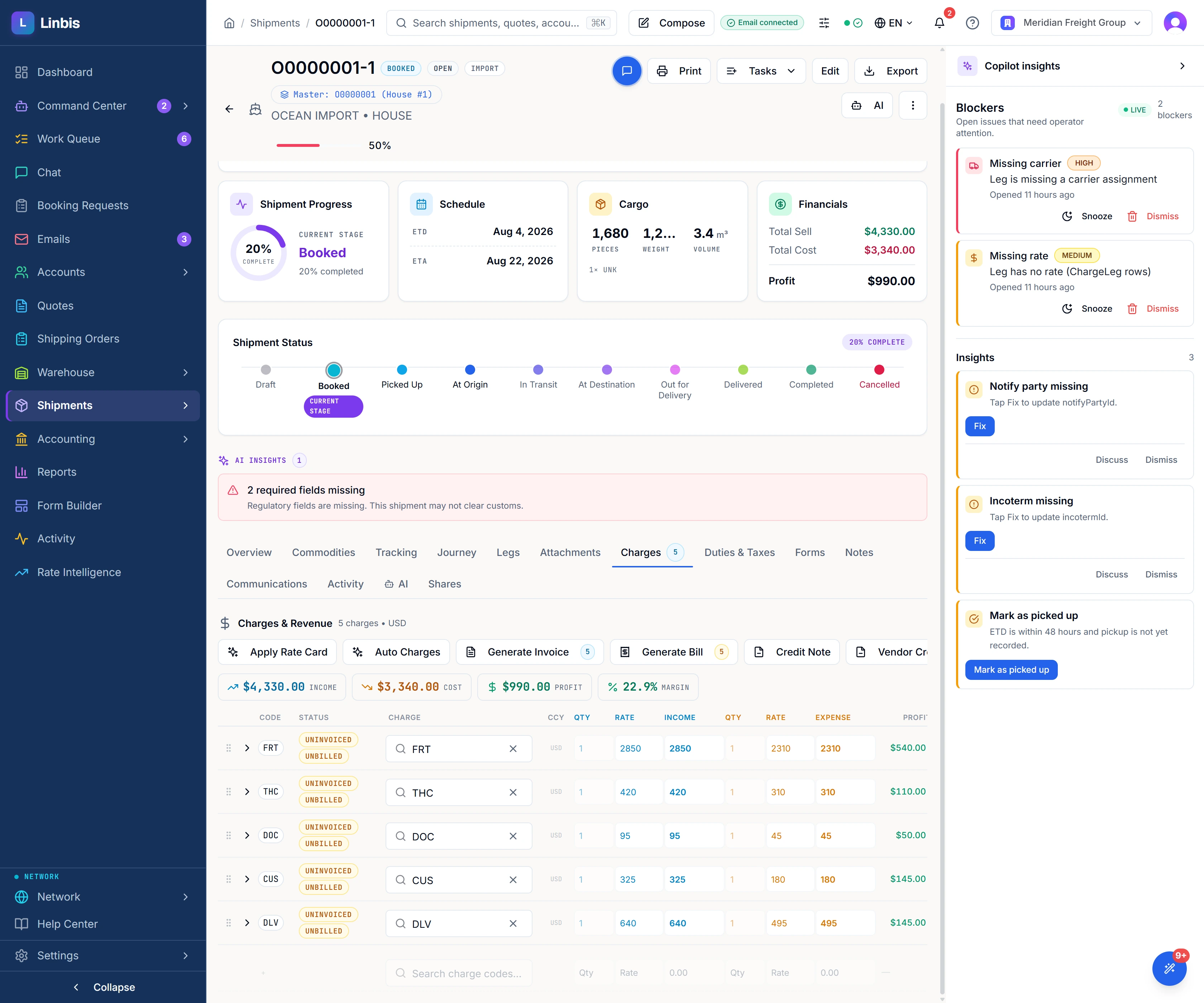
Magaya has an accounting module inside the suite; the two questions to ask in the demo are whether the customer’s price and the carrier’s cost sit on one line, and whether you can close a period and file from its ledger. On Linbis, both sides of the money sit on one charge line in independent currencies with the profit per line and the P&L per file computed from them — and a line’s tax follows its principal down the same conversion path so the two cannot drift. The invoice and the vendor bill are issued from those rows. The ledger is a real double-entry one: a 91-account freight chart of accounts on day one, including agent receivable, agent payable and agent commissions; periods that close and lock; balanced journal entries with reversals; trial balance, balance sheet and income statement. And you choose where the books live — in Linbis, in QuickBooks Online, or both — through a sync that covers thirteen QuickBooks entity types (payments and bill payments both ways) and handles the overseas agent who is simultaneously your customer and your vendor. The agent statement nets what an agent owes you against what you owe them per shipment.
What moves across, and how
| What | How it arrives in Linbis | What to check on arrival |
|---|---|---|
| Customers, vendors, agents | File import (CSV) through the Import Accounts wizard, with a dry-run preview before anything is written | Duplicates merged; the agent that is both customer and vendor set up once with both roles |
| Open shipments and consolidations | File import (CSV); masters and houses re-paired | One consolidation opened end to end: master, houses, cargo lines, documents |
| Warehouse inventory and receipts | Warehouse receipt import; cargo lands in zones and bins with its customer file | One physical count against the imported inventory; one storage billing run compared to Magaya’s last |
| Open invoices and bills | Opening balances into AR and AP; or keep them in QuickBooks and connect the sync | Aged receivables total matches to the cent |
| Document templates | More than 90 built-in templates, over 75 of them rendered live from the record (the default warehouse receipt is the Magaya-style layout); or build your own in Forms Studio, the browser designer, from 22 ready-made templates or a blank page, binding up to 288 fields on a shipment document | Print the house bill, arrival notice and warehouse receipt from one real file and show them to a customer |
| Rates and contracts | Carrier tariffs dropped in as spreadsheet, PDF or scan; customer contract cards created and approved by a second person | Quote one real lane and compare the priced lines to your last quote |
| Users, roles, workflow | Roles on a 79-permission grid; the workflow flows you actually use (24 shipment flows plus five other record types) configured by you | Each desk role logs in and sees only what it should |
| History | From Magaya, through the same import wizards. On Premium and Enterprise, a phased migration with a specialist brings the history over only for customers moving off the old Linbis Logistics platform | A closed file from last year opens with the fields you imported |
The four-week switch, week by week
Week 1 — audit and export
List the Magaya modules you actually use and the reports you actually read. Export customers, vendors, agents, open shipments, open invoices and bills, warehouse inventory, and the document templates you customised — as files, not screens. Start the Linbis trial (no card) and run the Import Accounts wizard in dry-run on the customer file first; read the preview before committing. Decide where the books will live: Linbis, QuickBooks Online, or both.
Week 2 — import and configure
Import accounts, then open shipments, then inventory. Map your charge codes to the 91-account chart. Pick your document templates (the default warehouse receipt is already the Magaya-style layout). Drop in your carrier tariffs and create the contract cards for your top customers. Configure the workflow flows and roles. Connect QuickBooks if the finance team keeps the books there.
Week 3 — one live shipment beside Magaya
Book one real consolidation on Linbis while Magaya still runs: convert the orders to houses in one action, receive the cargo on the scan app, print the house bill and the warehouse receipt from the record, issue the invoice from the charge lines, transmit one ISF if you file. Run one storage billing. Compare every output with Magaya’s. Train each desk role on the screens it uses.
Week 4 — cut over and close
Move the remaining open files, freeze Magaya to read-only, switch the customer portal on, and run the month-end on Linbis. On Premium and Enterprise a specialist walks the close with you. Keep Magaya’s exports; you will not need to re-key them.
Where Linbis wins
Mechanisms, not adjectives — each one is testable in the trial.
- The price is on the website. $150 including one user; $299 including three; enterprise by quote. Magaya’s pricing page is a 404.
- The warehouse is on the same file as the shipment, included on Premium, with offline scanning, per-line reconciliation and snapshot storage billing — and a Magaya-style receipt as the default receipt form.
- One charge line carries both sides of the money, in two currencies, with the margin on it.
- A ledger you can file from — or QuickBooks, or both — through a sync across thirteen entity types (payments both ways) that handles agents who are both customer and vendor.
- Customs filed from the shipment under your own bond by a CBP-approved software provider.
- Consolidation engineered for volume. Five hundred orders to houses in one action; nineteen fields cascade; bulk edits do not send bulk emails.
- Documents that fix themselves. More than 90 templates, over 75 of which render from the record at print time.
- Every tenant designs its own workflow without an implementation partner.
- An AI you can govern and audit — four levels, thirty-five categories, an envelope, replay before enabling.
- Seven interface languages, eight in the portal, on one login.
Where Magaya wins
- ABI entry filing. Magaya positions its Customs Compliance product around it; Linbis leaves entries to the broker’s path.
- A standalone WMS. If the warehouse is the business rather than a service to the forwarding desk, Magaya WMS is built as its own product.
- Installed base and footprint. 2,300+ customers in 100+ countries (its figures) and decades in the US–Latin America corridor. A forwarder who wants the platform its agents already use may prefer that.
- Sales-sized plans. If you want someone to size the plan to your operation rather than choosing from three published tiers, that is what Magaya offers.
Test it on one live shipment before you decide
- Receive one real consignment on the scan app, with the Wi-Fi off for part of it, and compare the receipt to Magaya’s.
- Convert three real orders into houses under one master in one action, then change the vessel on the master and count how many houses updated.
- Put the customer’s price and the carrier’s cost on the same charge line in two currencies and read the margin; issue the invoice and the vendor bill from it.
- Assemble one ISF from the shipment and see what the platform says is missing before transmission — and whose SCAC and bond it files under.
- Run one storage billing and reproduce it a day later from the snapshot.
What it costs
Plans are published on the pricing page. Startup is $150 a month including one user. Premium is $299 a month including three users and adds the warehouse module and data-migration assistance. Enterprise is quoted for larger teams. Every plan starts with a free trial that does not ask for a card. For the three-way view with CargoWise — the multi-branch rows, the December 2025 repricing — read Magaya vs CargoWise vs Linbis; for the six-vendor table, CargoWise alternatives; for all of them, the comparison hub.
Questions forwarders ask
Does Magaya publish its pricing?
Not on the date above: magaya.com/pricing returns a 404, and plans are sized in a sales conversation. Linbis publishes $150 a month including one user and $299 including three.
Will my customers notice the switch?
They will notice the portal — booking and quote requests, document approvals, inventory, delivery scheduling, in eight languages. The default warehouse receipt is a Magaya-style layout, modelled on Magaya’s receipt and restyled in Linbis’s document design.
Can Linbis file customs like Magaya?
ISF 10+2 and AMS, yes — from the shipment, under your own SCAC and bond, as a CBP-approved software provider. ABI entry filing, no — that stays with the broker. A brokerage should weigh that difference first.
How long does the migration take?
Four weeks is the plan above, with one live shipment running beside Magaya in week three. Magaya data comes in through the import wizards, whose dry-run previews show what will change before it does; Premium and Enterprise include a phased migration with a specialist for customers leaving the old Linbis Logistics platform.
What if we keep the books in QuickBooks?
Keep them there. Linbis syncs thirteen QuickBooks entity types — invoices, bills, vendor credits and journal entries go out, tax codes come in, payments sync both ways — and maps divisions to QuickBooks departments. Or run the Linbis ledger, or both.
See the price before the demo.
Plans are published. The trial is free and does not ask for a card. Start with one live shipment beside your current system.