
Freight management software for freight forwarders
One file that runs the whole movement — quote, booking, shipment, documents, invoice, profit — with AI doing the reading and your team doing the deciding. This page shows the real product, not illustrations.
The short answer: Freight management software runs a forwarder’s operation end to end: quotes priced against your own rates, bookings and shipments in every mode, the paperwork generated from the file, charges that flow to the invoice, and the profit visible per file. Before comparing tools, know which side of the industry a product serves — forwarder platforms, broker TMS, and shipper TMS are three different species that share one search term.
Forwarder, broker, or shipper software? Settle this first
Most pages ranking for "freight management software" never say who their product is actually for — and the three buyer types need genuinely different systems. The quickest way to shortlist honestly:
| You are a… | What you actually need | The tell |
|---|---|---|
| Freight forwarder / NVOCC | House and master files, consolidation, international documents, agent settlement, multi-currency billing | The demo shows an HBL under an MBL |
| Freight broker | Load boards, carrier sourcing, dispatch and settlement on domestic truckload | The demo shows loads and carriers, not consolidations |
| Shipper / BCO | Rate comparison across carriers, booking, tracking of your own cargo | The demo starts at "get a quote", not "make a quote" |
Linbis is the first kind: built around the forwarder’s file. If you broker domestic truckload only or ship your own goods, different tools serve you better — and knowing that saves you a demo.
One file, start to finish
The thing that actually kills margin is re-typing: quote in a spreadsheet, booking in email, shipment in one system, invoice in another. In Linbis the file carries itself:
- Quote it — priced against your own rate cards, margin visible, sent in your brand, accepted on a public link that never shows your cost.
- Convert it — the accepted quote becomes the shipping order, shipment, or warehouse receipt in one action — parties, charges, commodities carried across.
- Run it — stages advance on real events; documents generate at the right milestone with the right data already on them.
- Track it — carrier milestones and the vessel or flight itself, with customer-facing tracking in your brand.
- Bill it — the same charge lines that priced the quote become the invoice — sell side and buy side on one row, so profit per file is a number, not a reconciliation project.
Watch: the file that knows what it’s missing
A real ocean import in Linbis — the readiness card says exactly what the file still needs before it becomes a problem at the port.
Video transcript
Every file knows what it is missing — and says so before it becomes a problem at the port.
The AI works the inbox. Your team works the queue.
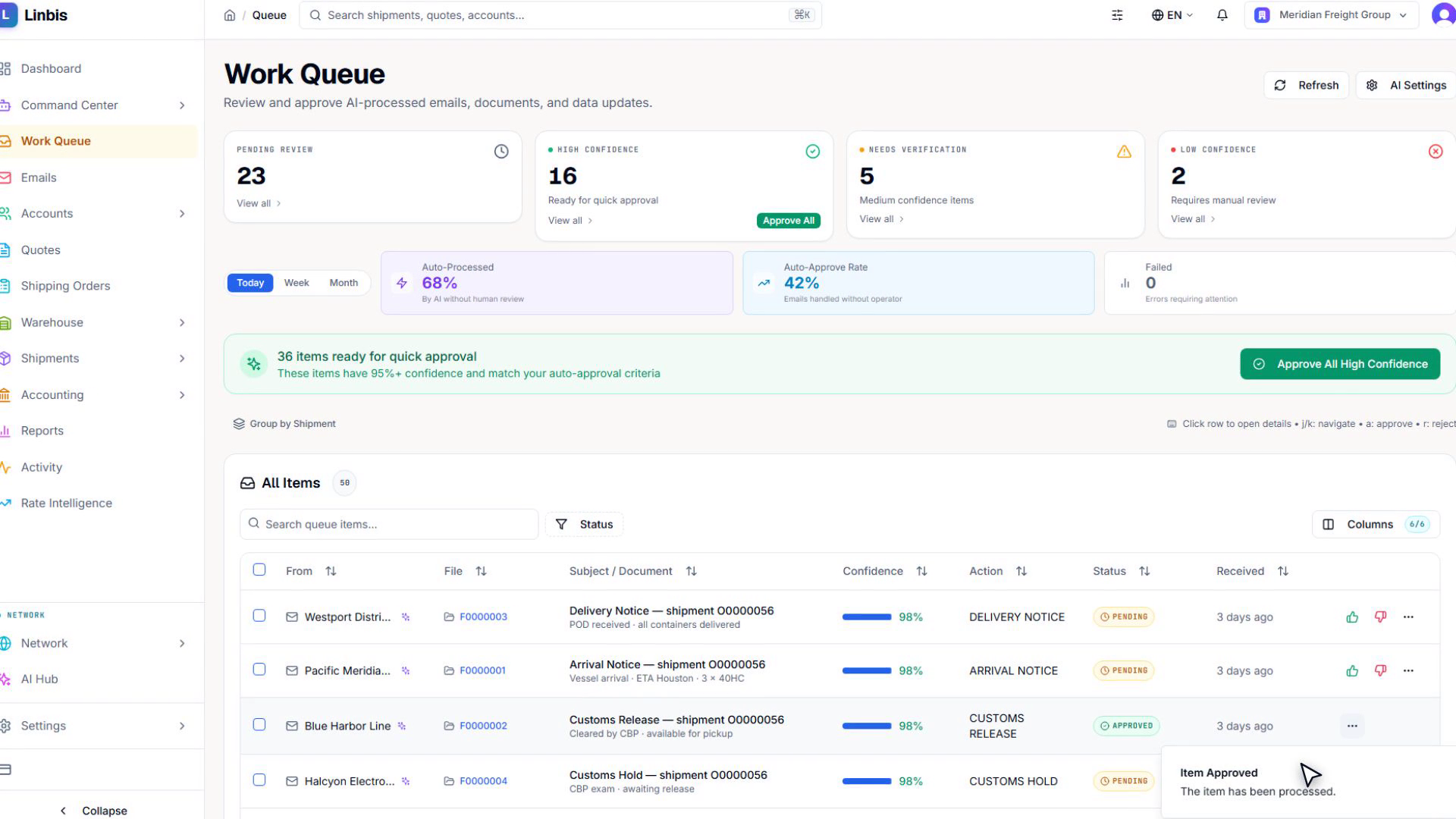
Email is where freight operations actually happen — so Linbis reads every message into one of 24 freight-specific categories, extracts the data (from the email and its PDF attachments), and stages the result as a proposed action. Nothing touches your operating data without a person approving it.
Watch: the work queue in 8 seconds
Everything the AI processed, triaged by confidence — approve the high-confidence items in bulk, review the rest one by one.
Video transcript
The work queue triages everything the AI processed — high-confidence items approve in bulk, the rest wait for a human.
The honest version of "AI automation": drafts, proposals, and queues — with a human pressing the button that matters. Deeper on the Logistics AI page.
Every mode, one system
Air, ocean, ground and multimodal files run in the same system with the mode-specific paperwork each trade needs — MAWB and house air waybills for air, MBL and HBLs with container-level control for ocean, BOLs and consolidated linehauls for ground. Consolidation is native: build a master, hang houses under it, and the two stay in sync automatically — one carrier update on the master writes itself onto every house.
Warehouse operations connect to the same files: cargo received against a warehouse receipt rolls into the consolidation without re-typing.
The money side is not an afterthought
Charges follow the file — priced on the quote, carried into the order and shipment, then invoiced from the same lines. Each line holds its sell side and its buy side together: income currency and rate, expense currency and vendor, and the per-line profit. Bill the customer in one currency while costing the carrier in another, on the same line.
Behind it sits real freight accounting — receivables, payables, per-file P&L, and two-way QuickBooks Online sync — so the operations file and the books never drift apart.
Frequently asked questions
What is freight management software?
Software that runs a freight operation’s files end to end: quoting against your own rates, bookings and shipments in every mode, document generation, charge and invoice management, and per-file profitability. For forwarders it must also handle consolidation (house and master bills) and international paperwork.
How is forwarder software different from a broker TMS?
A broker TMS manages loads, carrier sourcing, and dispatch for domestic truckload. Forwarder software manages files — houses consolidated under masters, international documents, agent settlement, and multi-currency billing. The search term is shared; the products are not.
Does Linbis handle air, ocean, and ground in one system?
Yes — with the mode-specific fields and paperwork each trade needs, plus multimodal files and native consolidation in every mode.
What does the AI actually do?
It reads incoming email and attachments into structured, freight-specific categories, drafts the resulting records and replies, and queues everything for human approval. It proposes; your team disposes. No email is sent and no record is created autonomously.
Can I see profit per shipment?
Yes — revenue against cost against margin on every file, and across the whole book. Charge lines carry both sides, so per-file P&L is computed, not reconciled by hand.
Does it replace my accounting system?
Your choice: run the built-in freight GL, keep QuickBooks Online with two-way sync, or run both. A forwarder already on QuickBooks does not have to abandon it.
Run the file once, not four times
Quote, book, ship, document, invoice — one system, with the AI reading and your team deciding.
Start Free TrialThe screens and clips on this page are the real Linbis product recorded on a demonstration company; workflows shown are production features.