
Linbis › Product › Supply chain management software
Product · Supply chain management
Supply Chain Management Software for Freight Forwarders, NVOCCs and 3PLs
Not a demand-planning suite. The operational supply chain a logistics provider actually runs — shipping orders, bookings, consolidations, warehouse receipts, customs filings, documents and invoices — on one record, with an AI copilot that prepares the work and a person who approves it.
What this page is for. "Supply chain management software" means two different products. One is the planning suite a manufacturer or retailer buys — forecasting, S&OP, inventory optimisation. The other is the system a logistics provider runs to move a customer's goods: the order that becomes a booking, the booking that becomes a consolidation, the cargo that lands in a warehouse and leaves as a delivery, the filing that clears it, and the invoice that closes the file. Linbis is the second kind. If you are a manufacturer looking for demand planning, this is the wrong page and we say so. If you move freight for other people — one office or many, in any of seven languages — keep reading.
Which kind of SCM software you need
The quickest test is who owns the goods. If your company owns the inventory and the question is how much to make or buy and where to hold it, you need a planning platform, and the vendors to look at are the enterprise suites. If your company moves goods that belong to your customers — as a freight forwarder, NVOCC, customs broker, courier or 3PL — then the supply chain you manage is operational: orders in, shipments out, cargo through a warehouse, filings to customs, paper to the customer, money in. That is the supply chain Linbis is built for, and it is a different product with different bones.
The difference shows up in the record. A planning suite's central object is the SKU. A logistics provider's central object is the shipment — and everything else (the shipping order that created it, the house bill under the master, the warehouse receipt, the ISF, the delivery order, the invoice, the vendor bill, the journal entry) hangs off that one record. Buy a planning suite to run a forwarding desk and you spend a year building the shipment object it does not have. Buy a transport-only tool and you spend the same year bolting a warehouse, a customs filer and a ledger onto it.
A second test is where the money lives. A supply chain system for a logistics provider is only complete if the charge you quoted, the cost you accrued and the invoice you sent are the same rows on the same file — because the margin question ("what did we make on that consolidation?") is asked on every file, every week. Linbis keeps income and expense on one charge line, in independent currencies, with the profit per line and the P&L per file computed from it. Most platforms in this category keep sell and buy in separate documents and reconcile later.
One record from shipping order to invoice
Here is the path a customer's goods take through Linbis, and where each module touches it.
- Shipping order. The customer's order arrives — as a booking request from the customer portal, from an email the copilot read, from a file import, or typed once — with its commodities, parties, the customer's purchase order number as a reference, and the required dates. It is the head of the file: an order stays open, becomes ready, and shows partially converted until the last piece has left as a shipment. Your customer can open their own shipping order in the portal without calling you.
- Quote and booking. A quote is priced from your own tariffs and customer contracts for any mode; when the customer accepts, the quote becomes the shipment without re-keying. Margin is visible while the quote is being typed, not at month-end. Lines the engine cannot price are refused rather than guessed.
- Consolidation. Up to 500 shipping orders imported from a spreadsheet become house shipments under one master in one action — in batches of fifty, each with its own file number, leg plan and copied charges. Nineteen fields propagate master to house, and an edit to the master's carrier, vessel, voyage, flight, ETD or ETA is written onto every house underneath it. Air or ocean, one office or several: the branch that booked it opens the same consolidation.
- Warehouse. Cargo received against the file — manifested pieces against what actually arrived, condition recorded per commodity (good, damaged, wet, crushed, open, missing label, repackaged) — put away in zones and bins, nested piece → pallet → container, and released with proof of delivery. The receipt lives on the shipment, not in a separate WMS.
- Documents. The house bill, arrival notice, delivery order, packing list, commercial invoice, warehouse receipt and the rest are live views of the record: correct a weight once and all of them update. Linbis ships more than 90 document templates; in Forms Studio, a browser designer, you start from one of 22 ready-made templates or a blank page and bind up to 288 fields on a shipment document.
- Customs. ISF 10+2 assembled from the shipment's parties and commodities, completeness-scored, and transmitted to US CBP — standalone or as an ISF-5 riding the AMS manifest bill — under your own SCAC and bond. EEI validated, denied-party screening against the US, EU, UK and UN lists, and duty and landed cost layered per line with the basis stated.
- Invoice, vendor bill and ledger. Charges accrue on the file as it moves; the invoice and the vendor bill are issued from the same charge lines; a double-entry ledger with a 91-account freight chart of accounts closes the period — or the books flow to QuickBooks Online through a sync across 13 entity types (payments both ways), or both.
That is the whole supply chain a logistics provider is responsible for, on one record, in one login, in English, Spanish, Portuguese, French, German, Italian or Chinese.
Real screens, captured August 2026 — the live product, not a mock-up
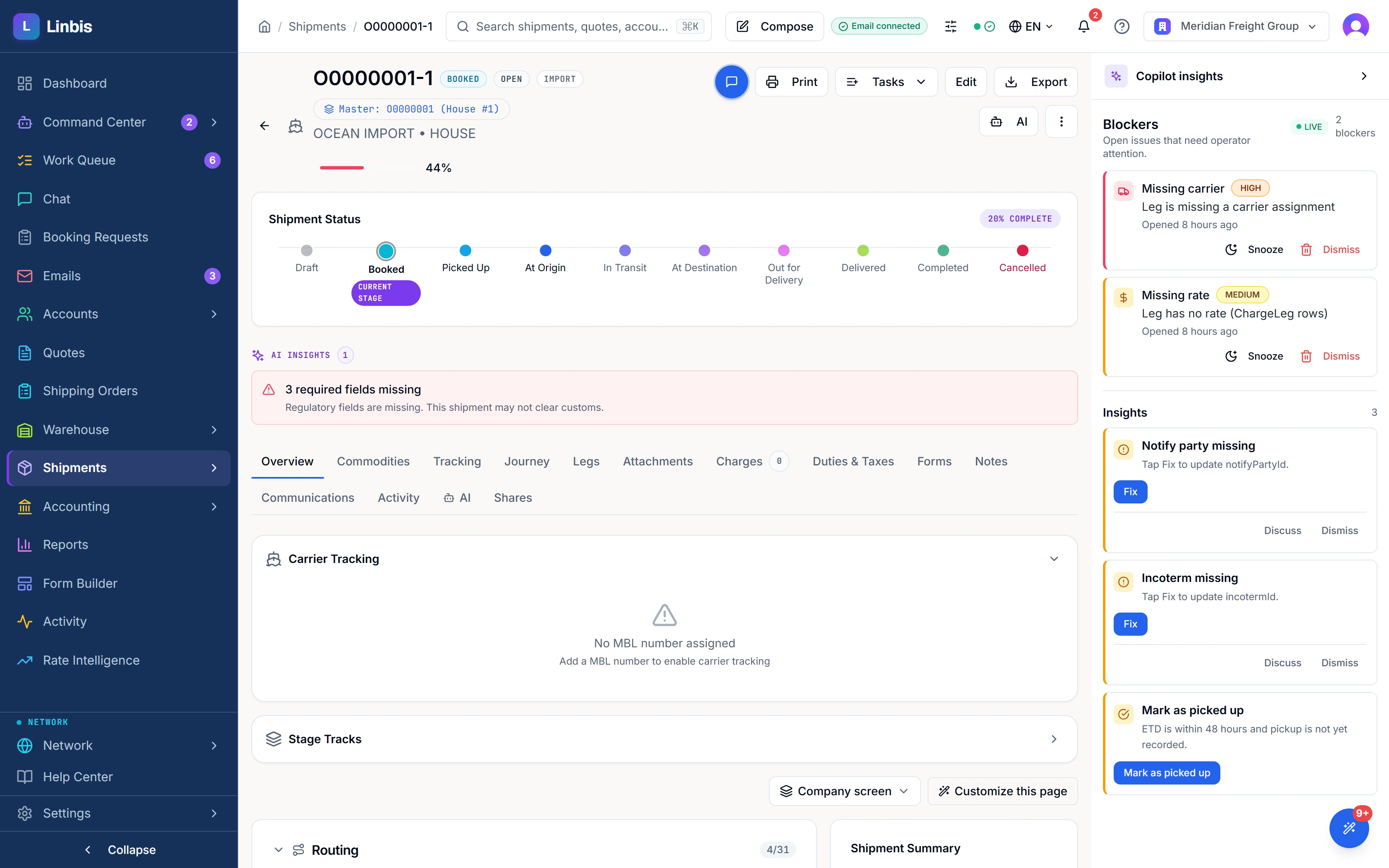
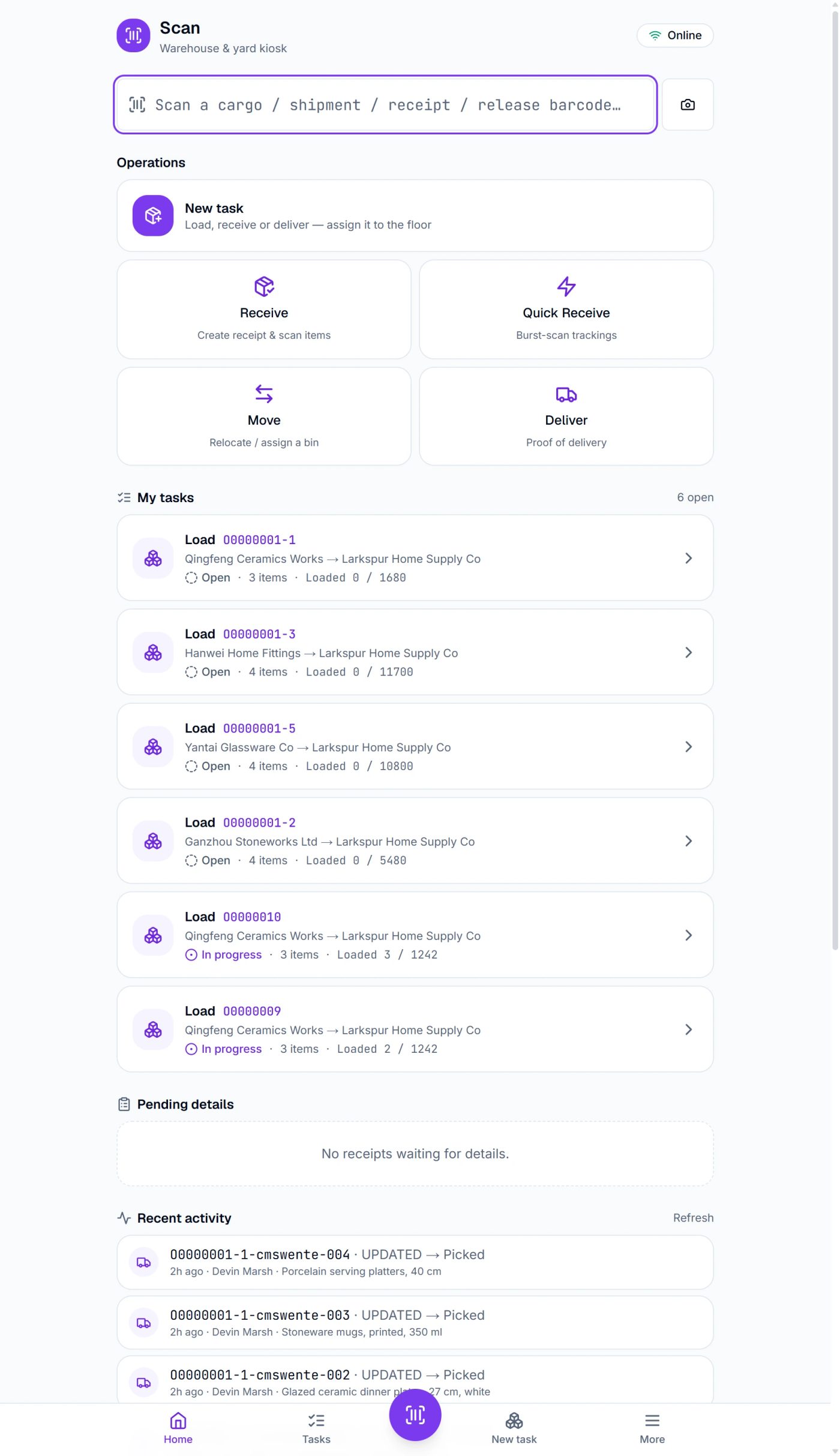
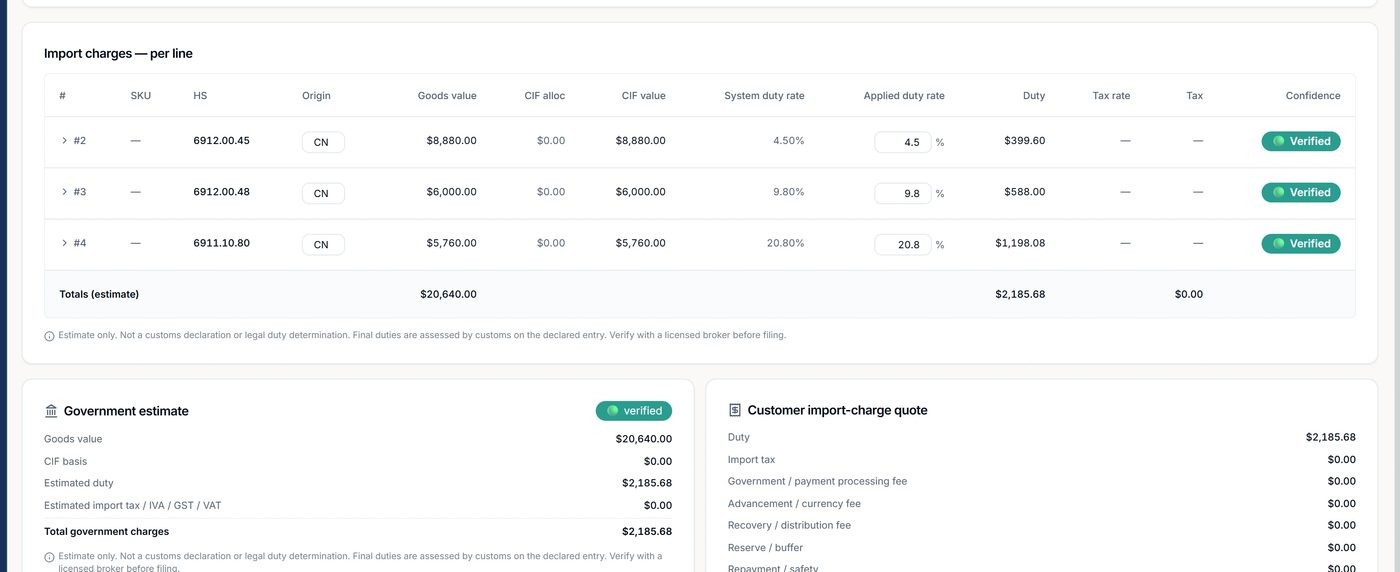
The modules, and what each one does on a real shipment
Shipping orders and bookings
Orders are received, tracked and converted — one order to one house, one order across several shipments, or up to 500 imported orders into a consolidation in one action. The customer's PO number rides on the order and on every shipment made from it, is indexed so the desk can search by it, and prints on the invoice. A customer with forty open orders can see which are booked, which are in transit and which have landed — and so can the desk, without a spreadsheet beside the system. (For the purchase-order view of the same record, see PO tracking for forwarders.)
Quoting, rates and contracts
Drop a carrier's rate sheet in — spreadsheet, PDF or scanned page — and get priced quote lines out: around forty basis phrasings normalised, unknown charge names matched to your own charge codes, weight-or-measure groups priced as the greater of weight and volume with a group minimum. Customer-specific contract cards are invisible to every other customer, need a second person to approve them, and retire the card they replace on the same lane without stranding a customer the new one does not cover. The printed quotation is built, edited and sent as a threaded reply from inside the customer's email thread.
Shipments and consolidation
Air, ocean and ground files; master and house pairing; consolidation and de-consolidation; the master's pieces, weight and volume re-totalled from its houses; tracking events on the record; bulk operations for high-volume desks so five hundred house shipments do not mean five hundred screens. A division tag on users, shipments and quotes carries into reporting and into QuickBooks departments, so a multi-office operation reports by office on one database.
Warehouse management
Included on the Premium plan: receipts and releases with proof of delivery, zones and bins, piece / pallet / container nesting, an installable barcode scanning app for receive, pick, pack, load and deliver that keeps working when the Wi-Fi drops and replays in order, manifest import with per-line arrival reconciliation, storage billing that freezes a per-piece snapshot per run, and releases that cannot be self-approved. Inventory belongs to the customer's file rather than to a separate WMS, and the customer sees it in the portal.
Documents
More than 90 document templates, over 75 of which render live from the record — the bill of lading in six variants (original or non-negotiable; rated, freight-only or non-rated) and as a seven-copy set, air MAWBs as a 12-copy set, and a Magaya-style warehouse receipt, restyled in Linbis's document design, as the default receipt form. The practical consequence is that the document is never out of date with the shipment, and nobody reopens six PDFs to fix one weight.
Customs and compliance
ISF 10+2 and AMS on the shipment, transmitted to CBP under your own SCAC and bond; EEI validation; denied-party screening; duty and landed cost per line. Coverage is centred on US electronic filing — for other jurisdictions Linbis produces the documents a broker files from, and a forwarder filing entries in many countries should say so in the trial and test the fit. Details on the AMS and ISF page.
Accounting, agents and CRM
A real general ledger seeded for freight, AR and AP subledgers, periods that close and lock, and an agent statement that nets what an overseas agent owes you against what you owe them per shipment. A CRM that knows which quotes turned into shipments. A customer portal with eighteen routes — booking and quote requests that arrive already assigned, document approvals, warehouse inventory, delivery scheduling, a messaging thread — in eight languages, plus no-login tracking links.
Forwarder's SCM vs enterprise SCM — a comparison
This is the comparison the search results rarely make, and it is the one that saves a buyer a year.
Linbis: $150 / month (1 user) · $299 / month (3 users) — published. Enterprise planning suites: quote-based, implementation measured in months.
| Enterprise SCM / planning suite | Linbis — logistics provider's SCM | |
|---|---|---|
| Central object | The SKU and the forecast | The shipment, with the order, documents, warehouse receipt, filing, invoice and journal entry hanging off it |
| Who owns the goods | You do | Your customer does |
| Core questions | How much to make or buy, where to hold it | Where is it, what does it cost to land, what paper is missing, what is the margin on this file |
| Consolidation (master / house) | Not a concept | Up to 500 orders per import → houses in one action; 19 fields cascade master → house |
| Shipping documents | Templates, if present | More than 90 templates, over 75 rendered live from the record; up to 288 bindable fields on a shipment document |
| Customs filing on the record | Usually a separate system | ISF 10+2 and AMS transmitted to CBP from the shipment; landed cost per line |
| Warehouse | Separate WMS licence | Included on Premium — offline scanning, zones and bins, snapshot storage billing |
| Money | Separate ERP | Income and expense on one charge line in two currencies; 91-account ledger; QuickBooks Online sync across 13 entity types (payments both ways) |
| Customer visibility | Internal dashboards | Portal with 18 routes in 8 languages; no-login tracking links |
| Languages | Varies | 7 interface languages; 8 in the portal |
| Implementation | Months to years; integrator-led | Free trial, no card; one live shipment beside your current system; import wizards with dry-run preview |
| Price | Quote-based | Published: $150 / month incl. 1 user · $299 / month incl. 3 users · Enterprise by quote |
Enterprise-suite characteristics are stated generically; specific vendors differ. The Linbis column describes the shipped product and the published plans as of the date above.
Visibility: the events a logistics provider's supply chain actually produces
Planning suites talk about visibility as a dashboard. On a forwarding desk, visibility is a list of events on a record, each with a source, arriving in the right order. The events that matter — and where each one comes from in Linbis:
| Event | Where it comes from | Who sees it |
|---|---|---|
| Order received | Portal booking request, email read by the copilot, file import, or typed once | Desk; customer in the portal |
| Quote sent, quote accepted | The quote record, sent as a threaded reply; becomes the shipment on acceptance | Desk; customer in their own inbox and portal |
| Cargo received, discrepancy, condition | The scan app at the dock — manifested vs received pieces, condition per commodity | Desk; customer sees inventory in the portal |
| Consolidated | Master/house pairing; each Maersk or CMA CGM milestone polled on the master, and any edit to its carrier, vessel, voyage, flight, ETD or ETA, are written onto every house | Desk on every branch; each customer sees only their houses |
| Departed, in transit, arrived | Container milestones from Maersk and CMA CGM over DCSA, pulled on request with your own carrier credentials; flights on 50 major cargo and passenger airlines followed by live aircraft position every five minutes once OpenSky Tracking is switched on, with departure and arrival recorded on the file | Desk; customer via portal and no-login tracking links |
| Free time running out | Four container clocks — demurrage, detention, terminal storage, chassis per-diem — each with its own free time and daily rate | Desk, before the bill arrives |
| Customs milestones | ISF and AMS status from CBP on the shipment | Desk; customer in the portal |
| Delivered, invoiced, paid | Delivery order with proof of delivery; invoice from the charge lines; payment link; ledger posting | Desk, accounting and customer — the same answer |
Because every event lives on one record, the question "where is it and what is it costing me" has one answer for the desk, one for the customer and one for accounting — the same answer. That is the operational meaning of supply chain visibility, and it is the thing a separate TMS, a separate WMS and a separate accounting package can never quite produce.
Money on the same record: charges, ledger, agents
Three things distinguish a supply chain system that is also the system of record for money from one that exports to accounting and hopes.
One charge line carries both sides. Bill the customer in USD while costing the carrier in EUR on the same row, with the profit per line and the P&L per file computed from it — and a line's tax follows its principal down the same conversion path, so the two cannot drift. Sell and buy never live in separate documents waiting to be reconciled.
A ledger you can file from. A 91-account freight chart of accounts on day one — including agent receivable, agent payable and agent commission — with periods that close and lock, balanced journal entries with reversals, trial balance, balance sheet and income statement. You choose where the books live: in Linbis, in QuickBooks Online, or both, through a sync that covers thirteen entity types (payments and bill payments sync both ways, the chart of accounts and tax codes come in, and invoices, bills, vendor credits, journal entries and the rest go out), and handles the counterparty that is simultaneously your customer and your vendor — the overseas agent case that breaks naive integrations.
The overseas-agent problem, solved in three places. Route an individual charge to an agent as bill-to; run an agent statement that nets debit-AR against credit-AP per shipment per counterparty, with a hard currency guard because the document leaves the building; and keep an agent master with commission rates, volume tiers, credit limit, bank details and its own AR/AP control accounts.
Customs filing on the shipment: ISF 10+2, AMS, landed cost
Linbis is a CBP-approved software provider. The ISF is assembled from the parties and commodities already on the shipment, scored for completeness before it goes, converted to the X12 message CBP expects, and transmitted — standalone, or as an ISF-5 riding the AMS 309 manifest bill — under your own SCAC and bond, with an attestation on every transmission. Export declarations are validated for EEI; parties are screened against the US, EU, UK and UN denied-party lists; duty and landed cost are layered per line with the basis stated rather than blended into a guess. Entry filing (ABI) remains the broker's path, and filings outside the United States are documents handed to a broker — which is the honest limit, and the one to test in your trial if you file in many jurisdictions.
The copilot, and the line it does not cross
An email arrives with a rate request, a purchase order and an attachment. The Linbis copilot sorts it into one of twenty-four classifications (twenty-three freight types plus unknown) with a confidence score you can see, lifts ports, equipment, weights and the PO number out of the PDF or image with the evidence beside each field, flags the lines it could not price, drafts the reply, and cites its sources. One Approve creates the shipping order or the shipment and fires its workflow — the same entry point as a manual create. Out of the box, that is the whole story: the AI proposes, a person approves. Then, when you are ready, you decide per action category — thirty-five of them, across four autonomy levels — how much it may do alone inside an envelope you define (modes, countries, cargo, value ceilings, customs regimes, established customers only), with high-risk actions requiring a human at every level and a replay of any policy change against your own history before you switch it on. In a supply chain where a wrong weight becomes a wrong invoice, that is the only kind of automation worth having.
Configured by your operation, not by a consulting project
Every tenant designs its own workflow: twenty-four shipment flows (mode × operation) plus five other record types, each with the stages your desk actually uses, seven kinds of automatic action on entering a stage across the six record types (six of them on a shipment stage), auto-advance on fields, documents, conditions or date math, exception routing that returns the file when the exception clears, and a database-level trigger so an operator click, an AI write, a spreadsheet import and an API call all fire the same automations. A five-hundred-record edit does not send five hundred emails; nothing double-sends and nothing is lost, and there are tests that pin that. Roles are a 79-permission grid; screens are laid out in a screen designer; documents in a document designer; contract pricing per customer. None of it needs an implementation partner, which is why the plan price is the price.
Integrations and data
A logistics provider's supply chain touches systems it does not own — the customer's ERP, the carrier's tracking, the accountant's ledger. Linbis connects four ways. Importers bring shipments, accounts, orders and warehouse receipts across as files, with a dry-run preview so you see what would change before it does; on Premium and Enterprise, customers moving off the old Linbis Logistics platform get a phased, resumable database migration run by the Linbis team. Carrier tracking and live flight position put container and flight milestones on the file without anyone typing them. QuickBooks Online syncs across thirteen entity types, with payments and bill payments flowing both ways. The customer portal and the email copilot are the integration with your customers: status is something they look up rather than something your desk answers by phone, and their requests arrive already assigned to a file. Plan-level inclusions are listed on the pricing page.
Who runs their supply chain on Linbis
- Freight forwarders — air, ocean and ground files from quote to ledger, with consolidation as one action and documents that fix themselves when the record changes.
- NVOCCs — house bills under masters at volume, container clocks, AMS and ISF under your own SCAC and bond, and a flat monthly plan whose cost does not rise with a busy month.
- Multi-office groups — every office on one record and one login, division reporting into QuickBooks departments, and interface languages for the team in Miami, São Paulo, Madrid, Hamburg or Shanghai.
- Couriers and consolidators — high-volume desks that need bulk operations, barcode loading and a customer portal, not a planning suite.
- 3PLs and warehouses — receiving against the customer's file, offline scanning, snapshot storage billing, and inventory that belongs to a shipment rather than to a separate system.
What it costs
Plans are published on the pricing page — no sales call required to see a number. Startup is $150 a month and includes one user. Premium is $299 a month, includes three users, and adds the warehouse module and data-migration assistance. Enterprise is quoted for larger teams. Every plan starts with a free trial that does not ask for a card. To see how the plans compare with the platforms forwarders usually shortlist — CargoWise, Magaya, GoFreight, Logitude, Descartes — read the comparison or browse every comparison.
Honest note on fit: Linbis is a smaller company than the enterprise suites; its public review base is small and old; its electronic customs filing is US CBP; and divisions are a reporting tag, not separate per-entity ledgers. It is the right choice for a logistics provider — of any size — that wants the operational supply chain on one record at a published price; it is the wrong choice for a manufacturer that needs demand planning.
Questions logistics providers ask
Is Linbis an ERP?
It is the operating system and the ledger for a logistics provider — orders, shipments, warehouse, customs filing, documents, invoicing and a 91-account general ledger — with a QuickBooks Online sync (payments both ways) if the finance team prefers to keep the books there. It does not do demand planning or manufacturing.
Can my customers see their own supply chain?
Yes. The customer portal shows their shipping orders, shipments, warehouse inventory, documents and tracking, lets them request bookings and quotes, approve documents and schedule deliveries, and runs in eight languages — without a phone call to your desk.
We have a separate WMS. Do we need to replace it?
Not necessarily. If the warehouse is the whole business, a dedicated WMS may be right. If it serves the forwarding desk, the module included on Premium keeps the receipt on the same record as the shipment, scans offline, and bills storage from a per-run snapshot — which is the thing separate systems never manage.
How does it handle a supplier that ships against ten purchase orders at once?
Each purchase order arrives as a shipping order carrying its PO number; imported together from a spreadsheet, the ten convert to house shipments under one master in one action, or an order converts in parts and shows partially converted until the last piece leaves. The PO number stays on every shipment and prints on the invoice. Test it in the trial with one real multi-order consolidation.
Does it file customs?
ISF 10+2 and AMS to US CBP, from the shipment, under your own SCAC and bond — Linbis is a CBP-approved software provider. Entry filing and other jurisdictions are the broker's path; Linbis produces the documents they file from.
Can we start without cutting over?
Yes — run one live shipment on Linbis beside your current system, then ten, then the desk. The import wizards bring shipments, accounts, shipping orders and warehouse receipts across as files with a dry-run preview, and Premium and Enterprise include a phased migration, run by the Linbis team, for customers moving off the old Linbis Logistics platform.
See the price before the demo.
Plans are published. The trial is free and does not ask for a card. Start with one live shipment beside your current system.
Sources. Plan figures and inclusions from linbis.com/pricing on the date above; product capabilities as shipped in the Linbis platform and verified against its code in September 2026 (counts — 95 document templates, 288 fields on a shipment document, 91 accounts, 13 QuickBooks entity types, 24 classifications, 35 action categories, 18 portal routes, 7 interface languages — are taken from the shipped configuration). Corrections: contact us and we will fix the page and note the change here.