
Freight forwarding software features — the complete Linbis reference
Everything Linbis does, organized by module: quoting, shipments, consolidation, warehousing, accounting, documents, tracking, rates, customs, AI, customization, and the customer portal. Every item on this page is a production capability of the current product — nothing planned, nothing roadmap.
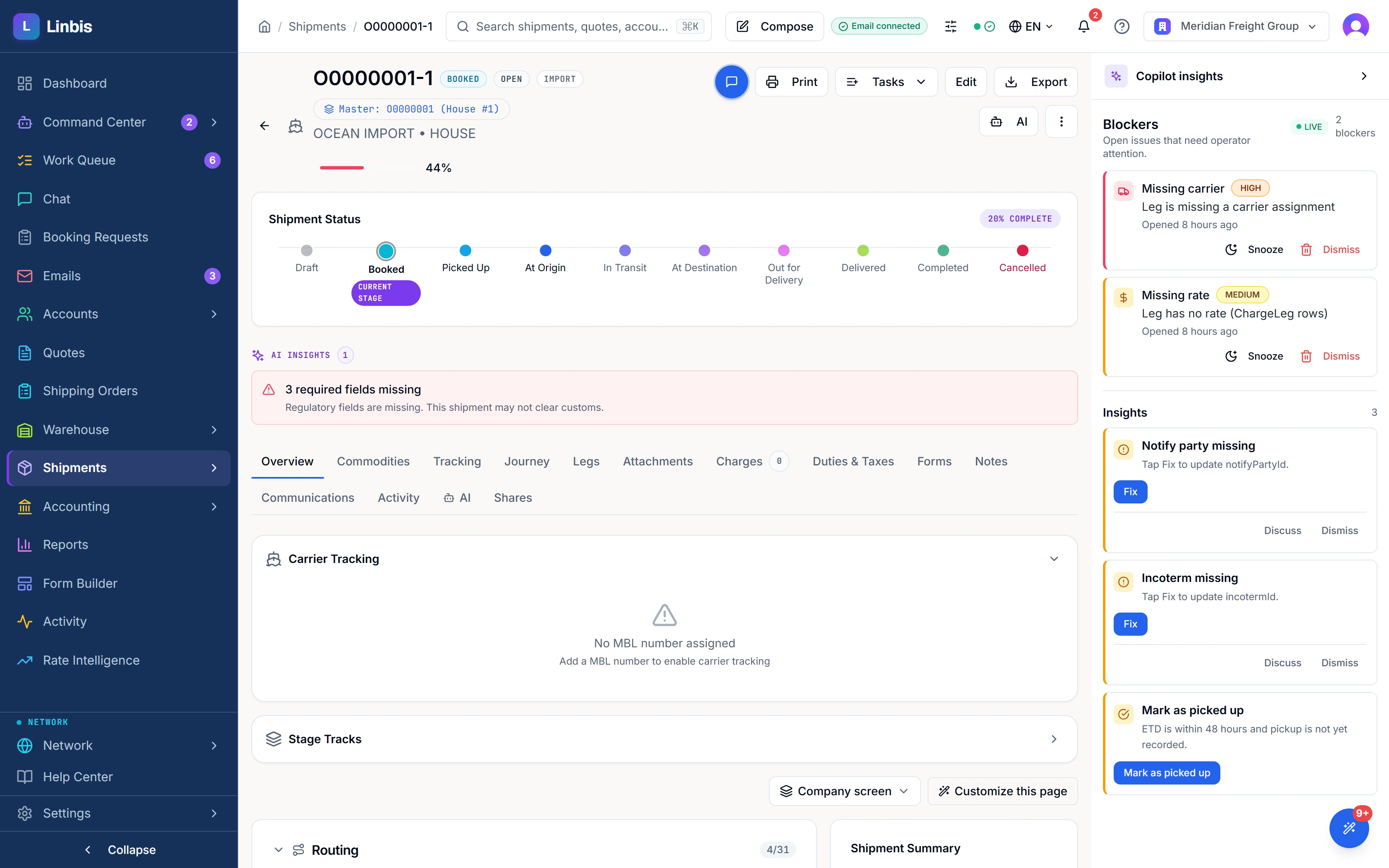
The short answer: Freight forwarding software runs the forwarder's whole file — quoting, booking, house/master consolidation, the trade's documents, carrier tracking, warehousing, customs paperwork, and the invoicing and accounting behind it — on one record, so the price you quoted and the invoice you sent are the same charge lines. Linbis covers all of it in one product: sixteen modules, from a quote priced off your own rate cards to a double-entry freight ledger that syncs with QuickBooks. This page is the reference — the audited inventory counts 286 production capabilities, and the roughly 140 headline items below are organized by module, each linked to its deeper page.
Prefer the tour to the checklist? The Linbis homepage walks the same product as a guided story on real screens — ten proofs, start to finish. This page is its companion reference: everything, enumerated. Use the one that matches how you evaluate.
Quoting & sales
The quote is a live document, priced off your own contracts, sent into the customer's thread — and convertible into the operating file without re-typing.
- A live, editable printed quotation inside the mail rail — the actual document, not a form that renders one later, sharing one state and one save path with the compact card.
- Auto-pricing against your own contract rate cards before anything is saved; an unpriced line says "no rate — enter" with the reason, never a misleading $0.
- A pre-send completeness check that names the blockers, and a send that waits for in-flight price autosaves — a stale price cannot be emailed.
- Quotes go out as threaded replies on Gmail, Microsoft 365, or IMAP — the customer sees "Re:", not an orphan message.
- A public, no-login accept/decline page with your cost, margin, and rep stripped from the payload itself.
- Nine print formats, including two Spanish variants and a split buy/sell layout.
- Per-line cargo detail — HS codes, unit values, dimensions, kg↔lb and m³↔ft³ conversion, volumetric weight.
- One-click conversion to a shipping order, shipment, or warehouse receipt, carrying parties, charges, commodities, and the rep who won it.
- Counter-offer handling — accept their number, propose different, or decline; repricing is atomic with the conversion, and the outcome is stored on the quote.
- Self-expiring quotes with a 3/7/14-day chase and AI-drafted follow-ups that never send without a human; restricted commodities park on a DG hold.
Deep page: freight quote software
Shipments — ocean, air & ground
One shipment file per movement, with the mode-specific paperwork fields each trade actually needs — and the operational depth underneath it.
- Air, ocean, ground, and multimodal files in one system, each with its own trade's fields and documents — and chargeable weight computed to IATA rules, rounded up to the next half kilogram for air, with carrier-specific dimensional factors.
- Multi-leg movements inferred automatically from the shipment's pattern — thirteen named routing patterns, pre-carriage and drayage legs added only when the door point is genuinely distinct from the port.
- Container control at the box level — seals, VGM under SOLAS, shipper-owned vs carrier-owned, load status, current location.
- ULDs for air; RoRo and used-vehicle export modelled properly: VIN, title number and state, odometer, running condition.
- Readiness and blockers on every file — what is missing, what is blocking, whether customs is holding it.
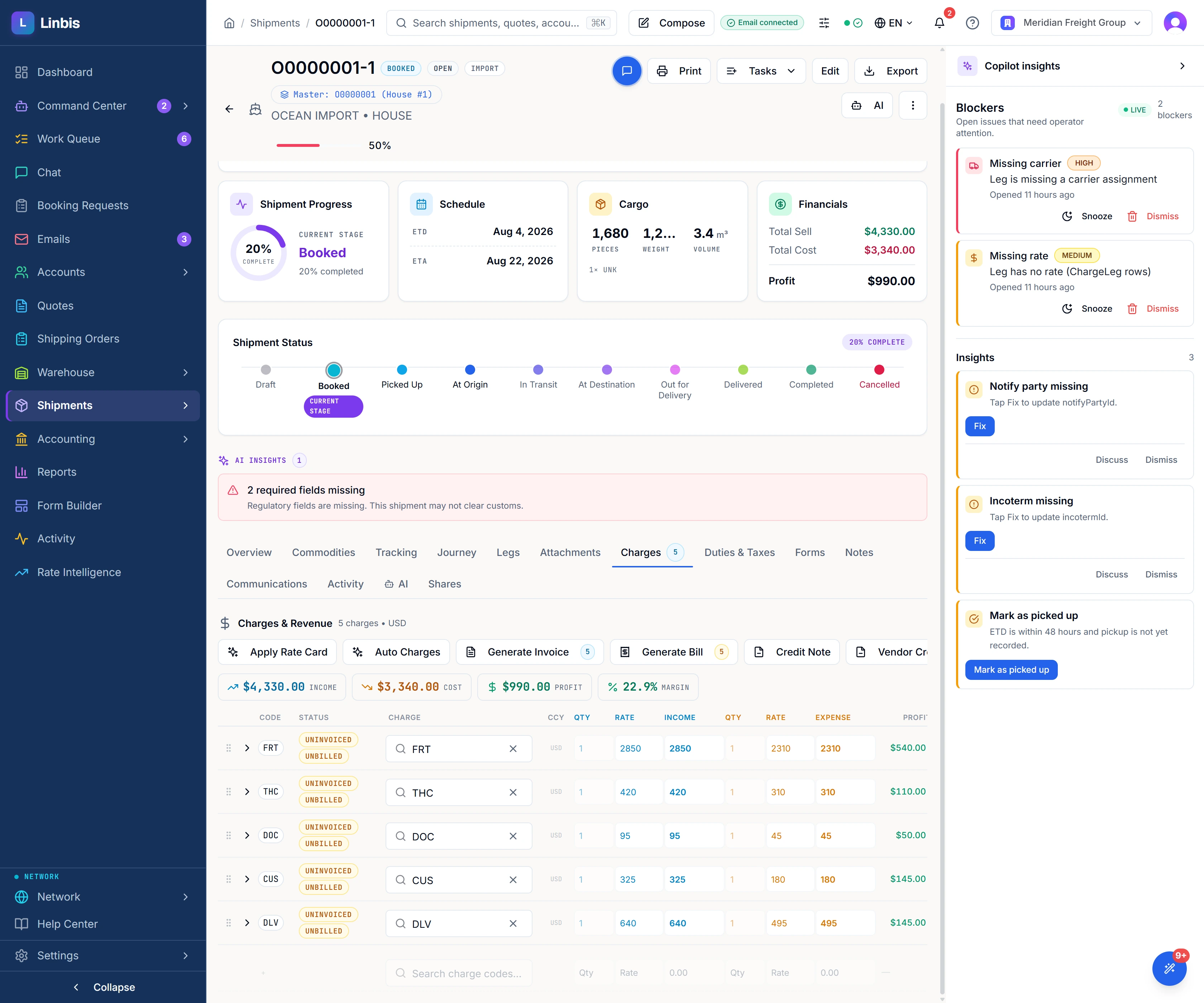
- Profit analysis per file, per container, and per leg, reported in your base currency.
- Operator intent beats the feed — manually edited fields are recorded and never overwritten by a carrier update; each can be handed back to the feed explicitly.
- Ocean CFS import operations as a modelled workflow — manifested-vs-received discrepancies, stripping, cargo and marks holds, arrival notices.
- Spreadsheet import with a dry run — suggested column mapping, duplicates flagged, background execution, party and port resolution on shipments and shipping orders, and saved mappings on shipping orders and receipts.
Deep pages: ocean freight software · air freight software · ground shipments
Consolidation — master & house
The forwarder's core object: many customers' cargo riding one master, with master edits cascading to every house instead of being re-keyed by hand.
- Build a master and hang houses under it — MAWB/HAWB for air, MBL/HBL for ocean — with the hierarchy visible on the file.
- Bulk conversion built for volume — hundreds of shipping orders become house shipments in one action, engineered in batches rather than a loop with a progress bar.
- 19 named fields propagate master→house automatically, and status cascades with them.
- House cargo re-aggregates onto the master — the master's pieces, weight, and volume are re-totalled from its houses when houses are converted into it or assigned to it, and whenever a house's cargo section or commodity lines change.
- Back-to-back files and master-from-houses created in one step.
- Three things on the master bill reach every house underneath it — Maersk and CMA CGM events polled on the master are copied to each house; an edit to the master's carrier, vessel, voyage, flight, ETD, or ETA is written onto every house; and the master's status carries to every house still open.
- Profit per house and per container, not just per consolidation.
Background reading: MAWB vs HAWB explained
Warehousing
Receipts, releases, scanning, and inventory — with the storage billing most operations forget to invoice.
- Warehouse receipts through the full inbound lifecycle — expected arrival to stocked cargo, with commodity lines, charges, customs detail, and POD.
- Releases and outbound with proof of delivery — captured signature and photos.
- Offline-first barcode scanning — scans queue locally when the Wi-Fi drops and replay in order when it returns; permanently rejected scans land in a visible issues list instead of vanishing.
- Scan-driven receiving — expected, blind, quick, and bulk, with piece-count enforcement and an undo.
- Zones and bin locations, with cargo-on-hand as a live register of every piece in the building, aged.
- Piece / pallet / container nesting at arbitrary depth with correct rollups everywhere — loose cargo builds into a container or master pallet and unbuilds again, and repack refuses to create a cycle that would drop cargo from totals.
- Storage and handling billing computed from on-hand inventory — each run freezes a per-piece snapshot (bin, days stored, billable days, charge), so a disputed invoice is reconstructed line by line.
- Separation of duties enforced — a release cannot be self-approved, and an inventory adjustment cannot be approved by its creator.
- Manifest import with arrival reconciliation — import what the customer announced, then reconcile matched / shortage / overage per line when the truck lands.
Deep page: warehouse management software
Accounting & QuickBooks
A real double-entry ledger built for forwarding — not an export to your accountant — with the charge line carrying both sides of the money.
- Double-entry general ledger with a 91-account freight chart of accounts seeded for you on day one — including agent receivable/payable and commission accounts — with accounting periods that close and lock.
- Income and expense on one charge line, in different currencies — bill the customer in USD while costing the carrier in EUR, with per-line profit computed, not reconstructed.
- Accounts receivable end to end — invoice from charges, post, age, credit-memo, collect, void.
- Accounts payable end to end — vendor bills, approval, posting, vendor aging, payment runs.
- Month-end correctness built in — revenue recognized on delivery (ASC 606) with deferral release, and cost accruals with match-to-bill and auto-reversal.
- Bank feeds and reconciliation with rules and auto-match.
- QuickBooks Online sync across 13 entity types (payments and bill payments both ways) — invoices, bills, payments, credit memos, journal entries, tax codes, multicurrency, divisions mapped to QuickBooks departments, and dedicated handling for the overseas agent who is customer and vendor at once.
- Choose where the books live — Linbis GL, QuickBooks only, or both in parallel; it is a setting, not a project.
- Hosted payment pages and payment links (Stripe) with escalating reminders and automatic cash application.
- AI vendor-bill intake — a carrier invoice email is extracted, correlated to the shipment, compared line by line against expected cost, and lands as a draft payable with a variance alert.
- The charge lock is enforced by the database — once a line is invoiced or billed it refuses edits until the document is voided; cost and margin are masked from roles that shouldn't see them, in the API and on printed forms.
- The overseas-agent problem, handled — route any single charge to an agent bill-to, keep an agent master file with commission rates, tiers, and credit limits, and produce a per-shipment statement netting what they owe you against what you owe them.
Deep page: freight accounting
CRM & sales pipeline
A working sales system fed by the inbox — not a place to store customer names.
- Accounts, contacts, account teams, and functional roles — who sells, who operates, who collects, per account — with account scoring and activity management.
- Drag-and-drop opportunity pipeline with weighted forecast, loss reasons, and competitor tracking.
- Inbound-email lead capture — a cold email becomes a proposed account, contact, and opportunity, routed to the right rep by lane and held for one-click confirmation.
- Duplicates collapse at the database — two colleagues emailing from the same company produce one proposed account, enforced by a unique index in Postgres, not racy app code.
- Portal quote requests arrive pre-assigned to the customer's usual rep.
Deep page: logistics CRM
Email & the AI Freight Desk
Any mailbox, read by AI into 24 classifications (23 freight types plus unknown), with a human Approve between the email and your operating data.
- Connect any mailbox — Gmail, Microsoft 365 (including shared mailboxes like ops@ and bookings@), or generic IMAP/SMTP — with per-mailbox access control: private, named members, or whole company.
- Push delivery with a no-loss ledger — every message the provider reports gets a durable accounting row before it is fetched; nothing is silently dropped.
- 24 classifications (23 freight types plus unknown) — arrival notice, pre-alert, customs hold, booking confirmation, vendor bill and more — and every result carries a confidence score; unknown or low-confidence email starts no workflow and is left for a person to handle.
- Field extraction from the email body and its PDF/image attachments — container numbers, MBL/HAWB, vessel, ETA, free time, charges, parties — with per-field evidence links.
- Approve-to-create — approving a booking email creates the shipment and fires its workflow; a quote request becomes a quote; a carrier invoice becomes a draft payable.
- A real composer — reply, reply-all, forward with attachments, cc/bcc, a chosen From mailbox, snippets, signatures, autosaved drafts — plus document sends straight off a record (eight entity types) with the right PDF pre-attached and links re-derived server-side at send.
- A rules engine with a dry-run tester that shares the production evaluator — what the tester predicts is exactly what production does.
- Shared-inbox triage — assign, snooze, mark done, tag, individually or in bulk; an open-items checklist per email with thread OPEN/WAITING/RESOLVED states.
- Internal comments with person and role @mentions, live presence, and typing indicators — discuss the email without the customer seeing.
- Company-wide email templates with validated merge tokens, and a do-not-send list enforced at the send call.
- Truthful outbound — bounce handling parses real RFC 3464 delivery reports, sends are exactly-once with an execution ledger, and a failed send says so instead of toasting success.
Deep page: logistics AI
Copilot, @Linbis & team chat
AI on every screen and in every channel — proposing, never executing without a person, inside an autonomy envelope you configure.
- A Copilot side panel on every screen — 90 tools, streaming answers, vision/OCR on pasted documents, slash commands.
- Every AI write is a proposal — the human click runs permission checks, an append-only decision log, and a five-minute undo that really reverts; a multi-step plan can be approved as one batch.
- @Linbis answers freight questions in chat from live records, with the rows it read cited underneath — the model is never the source of a fact.
- Answers carry the reader's access — the moment a customer is in the channel, every query re-runs at that customer's scope.
- Type a file number and the live record unfurls — lane, status, ETA, consignee — scoped to what the reader may see.
- @Linbis drafts customer email as a pending draft in the Freight Desk; it cannot send from chat.
- Sentinel: 19 named background checks sweeping the whole book — demurrage cost, cut-off deadlines, duplicate MAWB/MBL, stale files, overdue invoices — deduplicated, priority-routed, with quiet hours — plus scheduled standing instructions and field-level monitors: "watch this for me" as a feature, not a habit.
- A governed autonomy policy — four levels across 35 action categories, inside an operating envelope (modes, countries, cargo, value ceilings); high-risk actions require a human at every level, you can replay a policy change against your own history before enabling it, and machine runs cannot inflate the accuracy metric that unlocks more autonomy.
- 16 specialist background agents you can watch, approve, correct, and hold to an accuracy number — with AI spend metered, budgeted, and killable per tenant.
- Freight-native team chat — DMs, groups, reactions, attachments, voice notes — plus record comment threads with a load-bearing INTERNAL vs SHARED split the customer can reply into from the portal.
- RED FLAGS with an acknowledgement ledger — "this needs an answer, from these people, by then," with a per-person countdown and WhatsApp escalation carrying a single-use ack link.
- The morning brief and shift handoff post themselves into each desk's channel, in each desk's own local clock, computed from the database rather than written by a model.
Deep page: logistics AI
Documents & Forms
More than ninety finished layouts out, OCR and AI extraction in — and a real template designer in the browser when the standard layout is not yours.
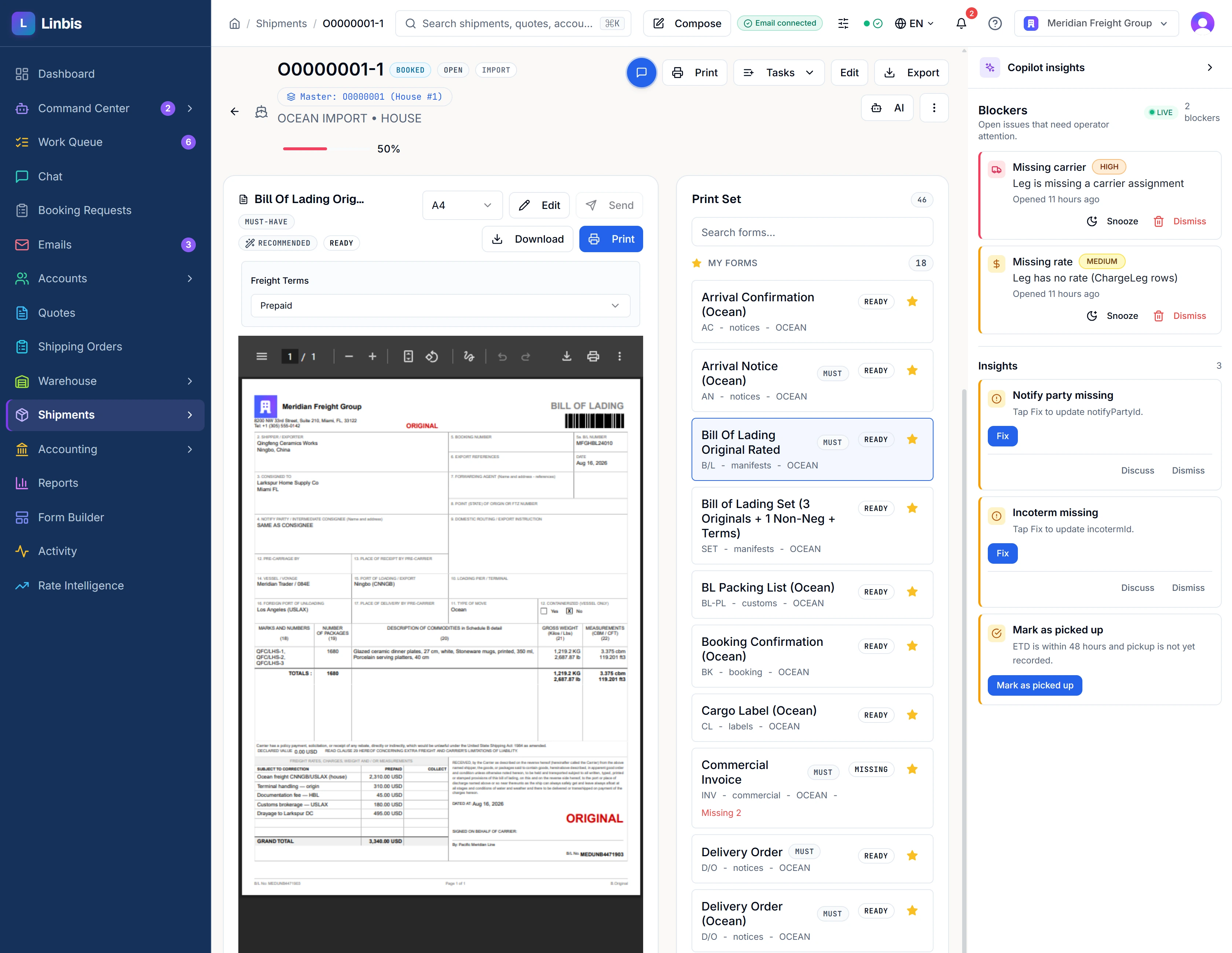
- More than 90 finished document templates, over 75 of which render live from the record — bills of lading, air waybills, manifests, delivery and pickup orders, PODs, certificates of origin, IMO dangerous goods declarations, packing lists, warehouse receipts and releases, and nine quotation layouts.
- The bill of lading prints in six variants — original or non-negotiable; rated, freight-only, or non-rated — and as a seven-copy set (3 originals + 4 non-negotiable, each with terms); air MAWBs print as a 12-copy set.
- Your letterhead and brand colour on every document, contrast-checked so a pale brand never prints white on white.
- Forms Studio: a drag-and-drop WYSIWYG template designer in the browser — millimetre-accurate multi-page geometry, repeatable tables, conditional visibility, no developer.
- Up to 288 freight data fields bindable into a shipment document (368 across shipment, quote, and invoice documents) by picking from a list — shipper, consignee, container, VGM, charges by currency, customs numbers.
- Documents generate themselves at the right milestone — booking confirmed produces the booking confirmation, HBL, and manifest without anyone remembering to.
- Masked fields are pruned from the PDF, not hidden — a buy rate a role cannot see is absent from the document's text layer, so it cannot be selected, copied, or text-extracted.
- Inbound paperwork is read, not filed — OCR plus AI extraction turns an incoming AWB, B/L, invoice, packing list, customs declaration, or POD into structured data.
- Reproducible, air-gapped rendering — the document tier needs zero outbound network, with assets inlined and a frozen render clock for byte-identical PDFs.
Deep page: documentation & guides
Tracking & visibility
Milestones from the carriers themselves, cost clocks that count free time in money, and one timeline fed from every source.
- An encrypted carrier credential vault for your own Maersk and CMA CGM tracking credentials.
- DCSA ocean container events mapped to your own stage names — refreshed on demand from the shipment's tracking panel today, with master→house cascade.
- Air freight tracked at the aircraft — flights on 50 major cargo and passenger airlines followed by live aircraft position every five minutes once OpenSky Tracking is switched on in Settings, with departure and arrival recorded on the file.
- Four independent cost clocks per container — carrier demurrage, carrier detention, terminal storage, chassis per-diem — each with its own free days and daily rate, resolved from your carrier rate catalogue rather than a second spreadsheet.
- A live countdown the operator can see — days elapsed, free days consumed, money accrued so far, and a seven-day projection, with the most urgent last free day rolled up to the shipment.
- An overnight watchdog that flags every container past or near its last free day, prices the exposure, and drafts the customer notice for approval.
- The arrival notice closes the loop — AI reads the carrier's email, the operator sees a field-by-field diff, and one approval stamps the shipment and opens the demurrage clock at the free days the notice itself quoted.
- A fleet control tower — live KPIs and a ranked queue of the files that need a human today — with predicted arrival carrying an upper and lower bound that learns from your own lanes as they repeat.
- Public tracking links — single, bulk, or per customer — branded, expiring, rate-limited, and revocable, showing your stage names with internal stages hidden.
- Email, partner, and AI-derived events feed the same timeline, so a lane with no carrier API still stays current.
Deep page: demurrage & detention
Rate intelligence
Your carrier's tariff, read by AI into structured rate cards that price your quotes — and an engine that refuses rather than guesses.
- Drop the carrier's rate sheet in — Excel, CSV, PDF, even scanned pages read by a vision model — and get structured buy/sell lines back.
- Confidence triage you can dial — high-confidence sheets promote themselves into live rate cards; doubtful ones queue for a human; thresholds and the kill switch are yours.
- ~40 tariff phrasings normalised to one basis, with unknown charge names fuzzy-matched to your own charge codes and an explicit ambiguity band that asks instead of guessing.
- Weight-or-measure groups priced correctly — MAX of revenue tons against CBM across the group, with the group minimum applied.
- Weight-break ladders where the tightest applicable break wins, with a deterministic tie-break.
- Customer-scoped contract pricing, fail-closed — a card scoped to one customer is invisible to every other customer and to anonymous lookups.
- Four-eyes approval on every rate change (approver ≠ creator, enforced in the database) with supersession that never strands a customer's contract rate.
- Governance on AI-created rates — database-level immutability, a verification SLA, an auto-flip back to pending, a per-tenant hard cap, and a nightly shape validator — plus a 30-day renewal queue, and expired cards can never price.
- Exact-or-refuse pricing — a basis the engine does not fully understand or a stale FX rate returns a named refusal, not an invented number.
- Ask carriers for rates from inside the quote — one sanitized RFQ email per carrier, human-approved before sending, with the reply parsed back onto the quote.
Rates price the quote directly — see freight quote software.
Drayage & local moves
Container-level trucking economics — the reconciliation nobody else does at the box.
- Drayage and trucking rates with per-container reconciliation — quoted versus charged, box by box.
- Suggested rate cards applied from the container side panel, with corrections saved back as a draft card for approval.
- Free time, demurrage, detention, terminal storage, and chassis per-diem read from the same carrier catalogue as your ocean rates — one catalogue, not two spreadsheets.
- Pickup & delivery orders with truck, driver, and PRO detail on ground files.
Deep pages: what is drayage · pickup & delivery
Duties, customs & landed cost
Duty layered the way customs actually stacks it, and compliance paperwork kept as validated records — prepared and scored in Linbis, filed through your broker.
- Layered US duty estimation — base MFN plus Section 301, Section 232, an anti-dumping applicability flag, MPF and HMF — with destination VAT/IVA/GST on the correct CIF or FOB-plus-duty basis.
- Bi-temporal, source-attributed rates from USITC HTS, the Federal Register, and World Bank WITS — see what the rate was on the day you quoted.
- A coverage tier and confidence label on every estimate, with per-line operator overrides recorded with a reason; anti-dumping cases route to your broker rather than being guessed.
- Bill duty the way your business does — estimate now, at actuals, advisory only, or broker-separate; rolled up or split out — and post it to the file as real charges.
- ISF 10+2 records with the real importer elements — auto-populated from the shipment's parties and commodities, validated, and completeness-scored.
- EEI/AES export records — USPPI, EIN, Schedule B, ECCN, licence and exemption codes — with validation.
- Customs entry records with hold handling, feeding the same exception workflow as every other hold.
- Denied-party screening against four sanctions authorities — the US Consolidated Screening List, EU, UK OFSI, and UN — with every hit written to a seven-year audit log.
- Customs and certificate documents from the file — the ISF worksheet, in-bond documents, the IMO dangerous goods declaration and the certificate of origin.
Background reading: duty calculator · ISF explained
Reports
The numbers a forwarder actually manages on, computed from the same rows the operation runs on.
- Per-shipment P&L — revenue, cost, vendor, and profit per line, with grand totals and an unprofitable count.
- Profit statement across the whole book.
- The agent statement — netting debit-AR against credit-AP per shipment per counterparty, built to be sent to the other side and defended.
- Aged receivables and payables.
- Trial balance, balance sheet, and income statement from the built-in ledger.
- Per-container and per-leg profitability, allocated to the individual box or leg in your base currency.
The books behind the reports: freight accounting
Customization & platform
The screens, the workflow, the documents, and the permissions all bend to the tenant — without a consulting engagement.
- Redesign the screens themselves — rename any field, hide it, drag cards and tabs into a new order, add custom tabs, choose column layouts — across thirteen surfaces.
- Save layouts as named views — personal or published company-wide, with version history and one-click restore.
- Every tenant defines its own workflow stages, per record type — shipments split by transport mode × operation type into 24 independently configurable flows.
- A visual stage designer — drag to reorder, rename inline, live preview, and a live count of records on each stage.
- A per-stage automation wizard with seven action types (a shipment stage offers six of them) — including emails with the right PDFs rendered and attached, personalised with merge fields, testable to yourself first.
- Per-stage send modes with three independent brakes — off, always-approve, or always-send, with a kill switch, recipient ceiling, and hourly budget; every refusal downgrades to a draft rather than being dropped.
- Stages advance themselves — on field completeness, document arrival, comparator conditions, or date math like "7 days before ETA" — per container where that matters, with exception routing to a hold stage and automatic return.
- Automations fire off database triggers, so an operator click, an AI write, a spreadsheet import, and a raw API call all trigger identically — and an idempotency ledger plus bulk suppression means a 500-record edit is never 500 emails.
- A shipment Journey view — where the file has been, what fired, what fires next and why it hasn't moved — computed from the same evaluator as the engine, so the forecast cannot drift.
- A drag-and-drop flowchart workflow builder with branching and server-side validation that names the fix when a workflow references a field the entity does not have — plus built-in freight playbooks: generated task checklists per shipment with dependencies and regulatory deadlines.
- Roles built from a 79-permission grid — record scoping like "only my accounts" re-derived on every query, plus a per-person switch that hides costs, buy rates, and margin.
- Enterprise hygiene — a tamper-evident audit trail that records delegation, an offboarding flow that previews everything a departing user holds and reassigns it, and tenant isolation enforced by the database itself.
How teams get set up: getting started with Linbis
Customer portal & network
Your customers self-serve on your brand; outside agents see exactly what you choose.
- A full logged-in customer portal — 13 screens — dashboard, shipments with live status, documents, invoices, warehouse inventory, delivery scheduling, pre-alerts, approvals, and reports.
- Customers raise their own booking requests, with free-text ports and party names resolved into real records under explicit confidence floors.
- Self-service quote requests that arrive in your queue already assigned to the customer's usual rep.
- Document approvals in the portal — customers approve or reject the paperwork you prepare.
- Two-way messaging into the same thread your team uses on the file — internal notes structurally invisible to the customer.
- Each contact sees only their own cargo, decided by the role you gave them; invite from the account record in two clicks, revoke just as fast.
- The portal speaks eight languages, chosen by the customer, installs to their home screen carrying your name, colours, and icon — and one customer login spans multiple forwarders on the platform.
- No-login tracking links for customers who shouldn't log in at all — with your milestone language, per trade lane.
- Share a single shipment with an outside agent by link — category-by-category control over what they see, charges gated on a financial permission, revocable — and the agent can claim it and message you back; partner agents can also be asked for rates through the network, even before they join.
Related: a website for your logistics company
What Linbis does not do — so your checklist is honest
- No live spot-rate marketplace or public index feed — Linbis prices from the tariffs, contracts, and carrier quotes you hold.
- Customs filings are prepared, validated, and completeness-scored in Linbis; transmission to customs authorities happens through your broker.
- Portal invoices are a list today — customers pay through the secure payment links you send, not an in-portal Pay button.
Frequently asked questions
What features should freight forwarding software have?
The checklist that separates forwarding software from generic shipping tools: quoting priced from your own contract rates; house/master consolidation (MAWB/HAWB, MBL/HBL) with master edits cascading to every house; the trade's documents generated from the file; carrier milestone tracking with demurrage and detention clocks; warehousing with scan-driven receiving; customs paperwork with validation; dual-currency charges with per-file profit; and a customer portal — all on one record, so quote lines become invoice lines without re-keying.
What does freight forwarding software include?
Linbis includes sixteen modules: quoting, shipments (ocean, air, ground), master/house consolidation, warehousing, accounting with QuickBooks sync, CRM, an AI email desk, an AI copilot with team chat, documents and forms, tracking and visibility, rate intelligence, drayage, duties and customs, reports, customization, and a customer portal. This page lists the roughly 140 headline capabilities, module by module.
How is freight forwarding software different from a generic TMS?
A generic TMS moves shipments; forwarding software runs a forwarder's business. The differences are structural: houses consolidated under masters with cargo that must reconcile, overseas agents who are simultaneously customer and vendor and must be netted shipment by shipment, and margin made line by line across two currencies on the same charge.
Does freight forwarding software include accounting?
Linbis does — a real double-entry general ledger with a 91-account freight chart of accounts, AR and AP subledgers, periods that close, and per-file P&L. If you keep books in QuickBooks Online, a sync across 13 entity types, with payments both ways, means you don't abandon it: run the Linbis GL, QuickBooks only, or both in parallel.
How does AI fit into freight forwarding software?
In Linbis, AI reads every inbound email into 24 classifications (23 freight types plus unknown), extracts fields from bodies and attachments, prices tariffs into rate cards, and drafts records and replies — and a person approves before anything is written, with an audit log and an undo. How much runs unattended is a policy you configure per action category, with high-risk actions requiring a human at every level.
See it as a story instead
This page is the checklist. The homepage tour is the same product shown working, screen by screen — or open the real thing yourself.
Start Free TrialEvery capability on this page is a production feature of the current Linbis product, verified against the codebase inventory (286 production capabilities audited). Screens shown are the real product recorded on a demonstration company.