
Freight quote software for freight forwarders
A freight quote is a small document with a lot riding on it: the buy rate, your margin, the customer's yes. This page shows what quote software should actually do for a forwarder — request in, priced quote out, acceptance, and the shipment created from it — with the real product on screen, not illustrations.
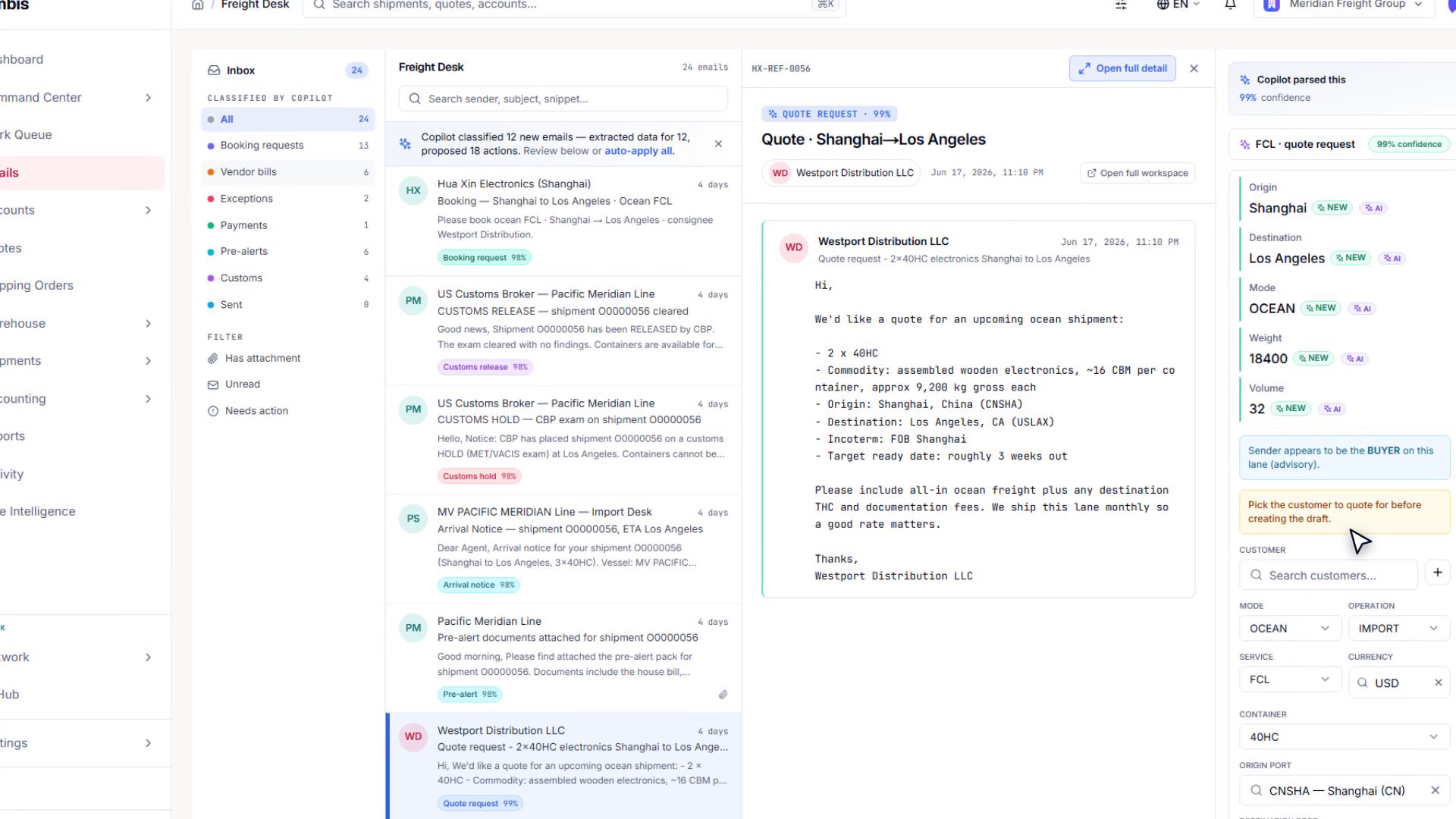
The short answer: Freight quote software takes a rate request, prices it against your own contract rates, applies your margin, produces a customer-ready quotation document, and — when the customer accepts — converts it into the shipment without re-typing anything. That is different from parcel rate calculators (built for webshop checkouts) and from rate-procurement portals (built for finding carrier prices). Forwarder quote software manages your selling process: buy rate, sell rate, margin, document, follow-up, conversion.
The workflow in Linbis — from email to accepted quote
Most quote requests arrive as an email. In Linbis, the quotation takes shape right where the request landed: the actual customer-ready document — your letterhead, your brand colour, the cargo table, the charges — builds as a live, editable surface inside the mail view. You are not copying details into a second system; the email becomes the quote.
Watch it happen — a quote request becomes a quote
A real request handled in the Linbis freight desk: the email is read, the cargo details are structured, and the quotation document takes shape for the operator to approve.
The real product. Nothing is sent to your customer without an operator pressing send.
Video transcript
A quote request lands in your inbox. Linbis reads it, structures the cargo, and prepares the draft quote — your team just approves.
- The request arrives — by email, from your customer portal, or typed in directly. Cargo, lane, and parties are captured once.
- Pricing runs against your own rate cards — every charge line either carries a rate from your contracts or says plainly why it does not. Linbis refuses to show $0 where it means "unknown."
- Your margin is visible before you send — buy side and sell side live on the same line, so the profit on the quote is a number you see, not a spreadsheet you maintain.
- Send, in your brand — the quotation renders on your letterhead with your brand colour, in nine print formats including two Spanish layouts.
- The customer accepts on a public link — no login needed, and your cost and margin are structurally invisible to them, not just hidden.
- One click converts it — the accepted quote becomes the shipping order, shipment, or warehouse receipt, carrying parties, charges, commodities and the sales rep across.
A worked example — why the chargeable weight decides the price
Air freight is priced on chargeable weight: the greater of what the cargo weighs and what its volume "weighs" at the carrier's dimensional factor (commonly 1:6,000 for air — one kilogram per 6,000 cubic centimetres). Quote software has to get this right on every line, because quoting the actual weight when the volumetric is higher gives your margin away.
| Step | Value | Where it comes from |
|---|---|---|
| Cargo | 24 cartons, 40 × 40 × 40 cm, 180 kg actual | The request |
| Volume | 1.536 CBM (1,536,000 cm³) | Computed from dims |
| Volumetric weight | 1,536,000 ÷ 6,000 = 256 kg | Air dimensional factor |
| Chargeable weight | MAX(180, 256) = 256 kg | The rule |
| Buy | 256 kg × $2.45 = $627.20 | Your carrier rate card |
| Sell | 256 kg × $3.10 = $793.60 | Your sell rate |
| Margin on the line | $166.40 | Visible before you send |
Ocean LCL runs the same discipline with a different rule — weight-or-measure, where a revenue ton is the greater of metric tons and cubic metres across the priced group, with the group's minimum charge applied. Linbis prices both correctly, and when a rate basis can't be resolved it says so instead of inventing a number.
Where the rates come from — carrier sheets become rate cards
The quote is only as good as the buy rates behind it. Carrier rate sheets arrive as Excel files, PDFs, even scanned pages — and Linbis reads them into structured rate cards you can price against. Confident extractions promote themselves; doubtful ones queue for a human.
Watch it happen — a rate sheet becomes live rate cards
A carrier's sheet is dropped in, the AI extracts the rates with a confidence label on each, and structured rate cards come out the other side, ready to price quotes.
The real extraction pipeline, run on a real sheet — not a mock-up.
Video transcript
Drop in any carrier rate sheet — Excel, PDF, even a photo. Linbis extracts the rates, labels its confidence, and one approval turns them into live rate cards, ready to price your quotes.
When you need a rate you don't have, Linbis drafts one sanitized rate-request email per carrier from inside the quote — and a human approves every one before anything leaves the building. Replies come back into the same workspace, so comparing carrier options happens next to the quote they belong to.
Comparing the options, side by side
Carrier options laid out with the numbers that matter, so choosing the rate behind the quote is a look, not a spreadsheet.
Video transcript
Rate shopping lays your carrier options side by side — price, transit time, reliability — and one click puts the winning rate behind your quote.
When the customer haggles — the part nobody's software models
Real quotes get negotiated. In Linbis, a customer's counter-offer reply is parsed into an amount, and the operator gets three honest buttons: accept their number, propose a different one, or decline politely. Accepting reprices the quote with one explicit adjustment line and converts it in the same motion — and the negotiation outcome is stored on the quote, so you can see later which lanes get haggled and by how much. Quotes also chase themselves: follow-ups at three, seven, and fourteen days are drafted for you — and only drafted. A person sends them.
Quoting is step one of the file's life. See how the accepted quote flows through the operation on the freight management software page, and what the plans cost on pricing.
Frequently asked questions
What is freight quote software?
Software that manages a forwarder's selling process: it takes a rate request, prices it against your contract rates with your margin visible, produces a branded quotation document, tracks acceptance, and converts the accepted quote into the shipment. It is distinct from parcel rate calculators and from carrier rate-procurement portals.
How is this different from a parcel shipping calculator?
Parcel calculators compare retail courier prices for a single package at checkout. Forwarder quote software works with your own negotiated buy rates, multi-line charges, chargeable-weight rules, margins, and a quotation document your customer signs off on — then turns that into an operational file.
Does the customer see my cost or margin?
No. The public acceptance link shows only sell-side prices — cost, margin, and internal notes are stripped from what leaves the system, not just hidden on screen.
What happens after the customer accepts?
One action converts the quote into a shipping order, shipment, or warehouse receipt, carrying the parties, charges, commodities and sales rep across. No re-typing, and the quote stays linked to the file it created.
Can it quote in Spanish?
Yes — nine print formats include two Spanish layouts, and all of them render with your letterhead and brand colour.
Does the AI ever send a quote by itself?
No. The AI reads requests, drafts quotes and follow-ups, and prepares rate-request emails — but every send is a human decision. Drafts wait for a person.
Quote it once, in one place
From the request email to the accepted, converted quote — with your rates, your brand, and your margin visible the whole way.
Start Free TrialThe screens and clips on this page are the real Linbis product recorded on a demonstration company; workflows shown are production features. Rates and figures in the worked example are illustrative — your carrier rates and dimensional factors control your actual pricing.